

I was digging through my old drawer last month when I found my Nokia 6300—that sleek silver candy bar with the clicky keypad that defined my entire high school experience.
I charged it up, scrolled through the menu, and there it was: Spider-Man: Toxic City. I pressed 5, the game loaded, and within seconds I was web-slinging through a pixelated New York skyline again.
Do you know that how good of a player you are and how often you survive a level or lose all your health highly depends on how well you understand your keypad and the timing of your dodges?
So today, I will give you a complete guide that will improve your gameplay a lot. I will walk you through the exact buttons to press, the mistakes I made so you don’t have to, and the boss strategies that took me hours to figure out on that tiny screen. Let’s get started.
Game Table
| Feature | Details |
|---|---|
| Developer | Gameloft |
| Publisher | Gameloft |
| Release Date | June 2009 (BlackBerry), November 2009 (Windows Phone) |
| Platform | Java ME (J2ME), BlackBerry, Windows Phone |
| Genre | Action / Side-Scrolling Beat-’Em-Up |
| Screen Resolutions | 128×160, 176×220, 240×320 |
| Game Modes | Story Mode (13 missions + 4 bonus stages) |
| Suit Options | Classic Red & Blue Suit, Black Suit |
| Collectibles | Golden Spiders (power/health/endurance), Golden Hearts (health refill), Comic Collections |
| Playtime | 3–5 hours for story, 6–8 hours for 100% completion |
| Compatibility | Nokia Series 40, Samsung Java phones, early Tecno/Itel Java devices |
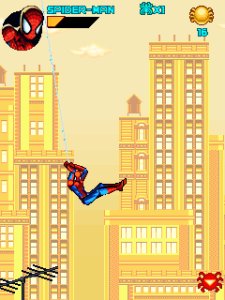
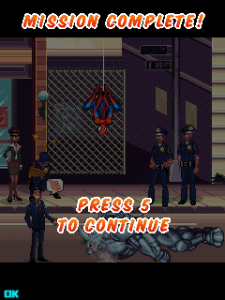
Game Screenshot

History & Background: The Golden Age of Superhero Mobile Games
Back in 2009, smartphones were barely a thing. If you wanted to play a real game on the go, you were doing it on a Nokia 6300, a Samsung E250, or one of those early Tecno or Itel Java phones with the physical keypad.
The mobile gaming landscape was built around carrier decks—those pre-installed game stores where you’d pay $5 or $6 for a premium title.
Gameloft was the king of this era.
They took console-quality ideas and squeezed them into MIDP 2.0 Java games that ran on 128×160 pixel screens. Spider-Man: Toxic City arrived right in the middle of this golden age, based on the Ultimate Spider-Man comics universe.
The game featured a darker, more urban storyline involving the Green Goblin and his mutated “Goblonites,” which gave it a grittier feel than the movie tie-in games that dominated the market.
What made Toxic City special wasn’t just the Spider-Man license—it was the fact that Gameloft managed to create a genuine side-scrolling beat-’em-up with web-slinging mechanics, vertical level design, and multiple suits on hardware that had less processing power than a modern calculator.
Key Features Breakdown
Story & Setting
The game follows the Ultimate Spider-Man universe. The Green Goblin has escaped prison and is holding hostages at Oscorp, mutating them into creatures called Goblonites.
Spider-Man is late for a date with Mary Jane Watson when he sees police cars rushing toward the chaos. The story unfolds across 13 missions with 4 bonus stages, taking you from school rooftops to Oscorp labs to the streets of New York.
Character Roster & Suits
-
Classic Suit: Balanced stats, standard web-fluid capacity.
-
Black Suit: Enhanced power and endurance, but some versions trade off web-fluid efficiency. You can select your suit at the start of missions.
Level Design
The levels are side-scrolling but with significant verticality. You can climb walls, swing across gaps, and drop down to hidden areas. Environmental hazards include toxic waste pools, collapsing structures, and electrified barriers.
Combat System
-
Melee Combos: String together punch/kick sequences with timed button presses.
-
Web-Shooting: Ranged attacks that can stun enemies or create web-shields.
-
Special Attacks: Context-sensitive finishers when enemies are low on health.
-
Web-Slinging: Traversal mechanic for crossing large gaps or reaching high platforms.
Collectibles & Resources
-
Golden Spiders: Increase your maximum power, health, or endurance meter.
-
Golden Hearts: Instant health refill.
-
Comic Collections: Hidden items that unlock bonus content or achievements.
How to Play: A Practical, Button-by-Button Walkthrough
I’m playing this on my Nokia 6300 with a standard 12-button keypad. The controls translate directly to any old Java phone—Samsung, Tecno, Itel, whatever you have with physical numeric keys.
Booting Up & Menu Navigation
When you launch the game, the Gameloft logo appears, followed by the title screen with Spider-Man swinging across a dark city skyline. Press 5 to move past the splash screens.
You’re now at the Main Menu. Use 2 to move the cursor up and 8 to move it down. The options are:
-
New Game
-
Continue
-
Options
-
Help
Press 5 to select. If you want to adjust the sound, highlight Options and press 5. Inside Options, use 4 and 6 to toggle sound effects and music on or off. Press ***** to go back to the previous menu.
Select New Game and press 5. The game asks you to choose your suit. Use 4 and 6 to switch between the Classic Red & Blue Suit and the Black Suit. I usually start with the Classic Suit because it has balanced stats and I want to learn the enemy patterns before relying on extra power. Press 5 to confirm.
Core Controls (Exact Keypad Mapping)
Here is the exact mapping you need to memorize. Don’t skip this—every advanced technique builds from these basics:
| Button | Action |
|---|---|
| 4 | Move Left |
| 6 | Move Right |
| 2 | Jump / Climb Up |
| 8 | Crouch / Climb Down / Drop |
| 5 | Attack (Punch/Kick) |
| 7 | Web-Shoot Left |
| 9 | Web-Shoot Right |
| ***** | Block / Web-Shield (hold) |
| # | Special Attack / Context Action |
| 0 | Pause Menu |
Combat in Practice when I played this game
Let me walk you through exactly what I do when I play.
Basic Enemy Encounter: A gangster appears on the right side of the screen. I press 6 to walk toward him. When I’m in range, I press 5 once for a quick punch.
If he blocks, I press 8 to crouch, then 5 for a low sweep kick that breaks his guard. If he swings at me, I press 4 to dodge backward, then immediately press 6 + 5 to close the distance and counter-attack.
Combo String: For a three-hit combo, I press 5 three times in rhythm—not too fast, not too slow. The timing is about half a second between presses. If I mash, Spider-Man will only do the first hit and reset. The full combo is: 5 (jab), 5 (cross), 5 (uppercut). The third hit knocks the enemy down, giving me time to move to the next threat.
Dealing with Multiple Enemies: When two enemies approach from both sides, I never stand in the middle. I pick one side, press 6 to move toward the right enemy, and press 5 twice to take him down quickly.
Then I immediately press 4 to face the left enemy. If they’re both too close, I press 2 to jump over them, land behind the group, and press 5 to attack from the rear. This breaks their encirclement.
Ranged Enemy (Goblonite Spitter): These enemies throw projectiles. When I see one, I don’t rush straight in. I press 4 or 6 to move vertically on the same plane until I’m aligned with them, then press 7 or 9 to shoot a web blast.
The web stuns them for about two seconds. While they’re stunned, I press 6 to run up and 5 three times for the full combo.
Web-Slinging & Level Traversal
Crossing a Gap: I stand at the edge of a platform. I press 2 to jump, then immediately press 7 or 9 (depending on which direction I need to swing) to shoot a web line.
Spider-Man will attach to the ceiling or an overhead point and swing across. The timing is critical—if I press the web button too late, I fall into the gap (usually toxic waste, which drains health fast).
Wall-Climbing: When I approach a climbable wall (indicated by a brick or metal texture), I press 2 to start climbing.
Related Posts
To climb down, I press 8. If I need to jump off the wall to reach a parallel platform, I press 2 to jump outward, then 6 or 4 to direct the jump mid-air, then 7 or 9 to web-swing to safety.
Finding Hidden Paths: Most players only press 6 to go right and rush through the level. I always check above me.
If I see a ledge or a break in the ceiling pattern, I press 2 near the wall to climb up. Many Golden Spiders and Comic Collections are hidden in these vertical areas.
In Mission 3, there’s a hidden Golden Heart above the second toxic pool that most players miss because they never look up.
Boss Fight Tactics
Shocker (First Boss): Shocker appears in an early mission. He has two attacks: a ground shockwave and a direct punch.
When the screen shakes slightly, that means he’s charging the shockwave. I immediately press 2 to jump—the shockwave only hits the ground level. While I’m in the air, I press 9 to shoot a web at him. After landing, I press 6 + 5 three times for damage. I repeat this pattern. Never stand still during this fight; always be moving with 4 or 6.
Rhino: Rhino charges in a straight line. When he backs up and lowers his head, that’s the charge tell. I press 4 or 6 (whichever direction gets me out of his path) to dodge sideways.
If he hits a wall, he’s stunned for three seconds. That’s my window—I press 6 to run to him and 5 four times for maximum damage. I made the mistake early on of trying to attack him head-on. Don’t do that. Wait for the stun.
Green Goblin (Final Boss): This is a two-phase fight. In phase one, he throws pumpkin bombs and summons Goblonites. When he reaches back to throw a bomb, I press 4 or 6 to dodge to the side, then press 7 or 9 to web-shoot him while his arm is still extended. The web interrupts his throw and deals damage.
In phase two, he starts flying and dive-bombing. When he hovers at the top of the screen and the shadow appears below him, that’s the dive tell. I press 4 or 6 to move out of the shadow’s path, then immediately press 2 to jump and 9 to web-shoot him in mid-dive.
This is the only window to damage him in phase two. I wasted three lives before I realized I had to attack during the dive, not after he landed.
Beginner Mistakes to Avoid
1: Button Mashing in Combat
I used to spam 5 as fast as I could, thinking more punches meant more damage. Wrong. The game has a combo rhythm. If you press 5 too fast, Spider-Man only does the first hit and resets, leaving you open to counter-attacks.
The correct rhythm is one press every half-second. Practice the three-hit combo: 5, pause, 5, pause, 5. Once you feel the rhythm, your damage output doubles.
2: Wasting Web Fluid on Weak Enemies
Your web meter is limited. I used to shoot webs at every single gangster, then I’d reach the boss with no web fluid left.
Here’s the rule: use melee (5) on single grunts. Save web attacks (7 or 9) for groups of three or more enemies, or for stunning bosses during their attack animations. In the Options menu, you can see your web-fluid meter—keep an eye on it.
3: Ignoring Vertical Paths
Most players only press 6 to go right. I was one of them. I missed half the collectibles in my first playthrough. Always look up. If you see a ledge, a ladder texture, or a break in the ceiling, press 2 to jump or climb.
In Mission 5, there’s a hidden Golden Spider above the third doorway that increases your maximum health. I only found it on my third playthrough because I finally looked up.
4: Tanking Hits Instead of Dodging
The game gives you a block with ***** , but holding it drains your endurance and slows you down.
It’s better to dodge. When an enemy raises their weapon, press 4 or 6 to sidestep, then counter with 5. In the Shocker fight, I tried blocking his shockwave with ***** and lost half my health bar. Jumping with 2 is always the better option.
5: Skipping Exploratory Sections
Some areas have multiple paths—one obvious forward path and one hidden upward path. The forward path usually has more enemies.
The upward path often has a collectible and a shortcut. In Mission 7, there’s a section where you can drop down with 8 to a lower path that bypasses three enemy encounters and leads directly to a Golden Heart. Explore every corner.
6: Forgetting to Drop Through Platforms
Certain platforms are thin and allow you to drop through them. If you’re on a platform and see enemies below, press 8 to drop down and attack from above. This is especially useful in the bonus stages where enemies patrol in patterns below you. I discovered this by accident when I pressed 8 thinking I was crouching, and Spider-Man dropped through the floor onto an enemy’s head.
7. Comparison with a Game I Played: Batman: The Dark Knight
I spent just as many hours on Batman: The Dark Knight Java version as I did on Toxic City. Both are Gameloft superhero beat-’em-ups from the same era, but they handle very differently on the keypad.
Control Responsiveness: Batman: The Dark Knight uses a similar 4/5/6 control scheme, but Batman feels heavier. His attacks have more startup lag, and his dodge is a roll instead of a sidestep. Spider-Man in Toxic City feels snappier.
When I press 4 or 6 to dodge, Spider-Man moves instantly. Batman’s roll has a half-second delay that got me hit multiple times. Toxic City wins on responsiveness.
Level Design: The Dark Knight is almost entirely flat. You move left and right, occasionally climbing a ladder.
Toxic City has genuine verticality—wall-climbing, web-slinging across gaps, and dropping through platforms. In Mission 4 of Toxic City, I had to swing across three gaps using 2 + 9, then climb a wall with 2, then drop down to a hidden area with 8.
The Dark Knight never asked me to do anything that complex. Toxic City wins on level design variety.
Combat Depth: The Dark Knight has a batarang throw (similar to web-shoot) and melee combos, but no equivalent to Spider-Man’s web-shield or wall-attack drops.
Toxic City lets you stun enemies with webs, block with *****, and attack from above by dropping through platforms. The combat toolkit is deeper. However, The Dark Knight has a stealth mechanic where Batman can hide in shadows—something Toxic City lacks.
Personal Verdict: I return to Toxic City more often because the web-slinging and vertical movement make every level feel like a puzzle, not just a brawl.
The Dark Knight is solid, but it plays like a standard beat-’em-up. Toxic City plays like a Spider-Man game. The web mechanics and wall-climbing are not just gimmicks—they’re integral to how you navigate and fight. On my Nokia 6300, Toxic City feels more rewarding to complete because it demands more from the player than memorizing attack patterns.
Conclusion
Spider-Man: Toxic City is more than a nostalgic relic—it’s a masterclass in doing a lot with very little.
On a 2-inch screen with a 12-button keypad, Gameloft created a game that genuinely captures the feeling of being Spider-Man: swinging through the city, dodging attacks with split-second timing, and battling iconic villains with nothing but your thumbs.
If you still have an old Nokia, Samsung, Tecno, or Itel Java phone sitting in a drawer, charge it up and give Toxic City another run.
Use the exact button presses I’ve laid out here, avoid the mistakes I learned the hard way, and you’ll see why this game is remembered as one of the best superhero titles of the mobile Java era.
What’s your favorite boss fight in the game? Drop your high-score stories or toughest level memories below.
Disclaimer
This article is an independent gameplay guide created for educational and informational purposes. Spider-Man: Toxic City is the property of its respective copyright holders.
This guide is not affiliated with, endorsed by, or sponsored by the game’s developers or publishers. Gameplay details may vary depending on the device model, screen resolution, and game version used.
