How to Play WWE SmackDown vs. Raw 2010 3D Java Game: The Only Guide You Actually Need
 By Nathaniel AriyoPublished · 12 min read
If you just opened this game and got wrecked by the computer in your first match, do not stress. That happened to me too. I was pressing random buttons thinking it would work like a console game, and the AI just kept reversing me over and over. It took me a while to realize that this version runs on a completely different rhythm. Once I figured out the timing, though, it became one of my favorite wrestling games to play during breaks.
This guide is about the mobile 3D version of WWE SmackDown vs. Raw 2010. It is the one with the 11-superstar roster and the numeric keypad controls. I am going to walk you through the exact buttons to press, how the menus work, how career mode actually flows, and a few tricks the game never tells you. By the end, you will know exactly what to do when the bell rings.
Game at a Glance
| Feature | What You Get |
|---|---|
| Developer | THQ Mobile |
| Release | October 2009 |
| Roster | 11 Superstars |
| Match Types | Normal, Steel Cage, Hell in a Cell, Submission, TLC/Ladder, Tag Team |
| Modes | Exhibition, Career Mode, Superstar Management |
| Controls | Numeric Keypad (0–9, *, #) |
The roster is small, but that is actually a good thing. You do not have to scroll through fifty characters. You pick one of eleven fighters, each with their own speed and power, and you learn how they move. That is the whole point.
History & Background
Back in 2009, this was basically the coolest wrestling game you could play on a phone. The “3D” looks simple now, but back then it was wild seeing John Cena actually run around a ring with camera angles on a tiny screen. The game was built for phones with physical keypads, so every move is mapped to a number button. That is why the controls feel so tight once you get used to them. It is not trying to be the giant console version. It is its own thing, and it works.
Key Features Breakdown
The Roster
You get eleven superstars. Depending on the version you have, it is usually something like John Cena, Randy Orton, The Undertaker, Batista, Edge, Rey Mysterio, Triple H, Shawn Michaels, CM Punk, Jeff Hardy, and Big Show (or Kane). They fall into three basic types:
- Powerhouses like Big Show and Batista: They hit hard but move slow. Their stamina runs out fast if you make them run too much.
- Brawlers like John Cena and Triple H: Balanced. Good for learning the game because they do not have huge weaknesses.
- High-Flyers like Rey Mysterio and Jeff Hardy: Super fast, great at diving off the ropes, but their grapples are weak. You have to play them differently.
I usually tell people to start with a brawler. If you pick Rey Mysterio and try to out-muscle Batista, you are going to have a bad time.
Match Types
- Normal: Pin or submission. Standard stuff.
- Steel Cage: Climb out or pin.
- Hell in a Cell: No escape. Fight inside the cage until someone gets pinned or taps.
- Submission: Only submissions count.
- TLC/Ladder: Set up a ladder, climb it, grab the item.
- Tag Team: You and an AI partner versus two AI opponents.
Superstar Management
This lets you assign guys to Raw, SmackDown, or ECW. It does not change stats, but it changes the arena look and the music. It is a nice touch if you are playing a lot of exhibition matches and want some variety.
Screenshots

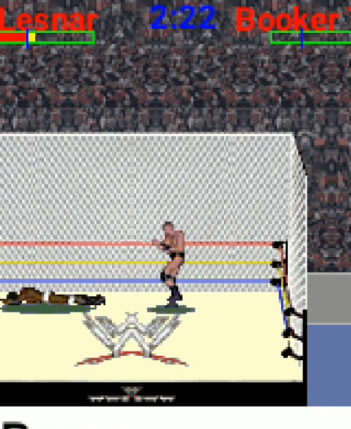
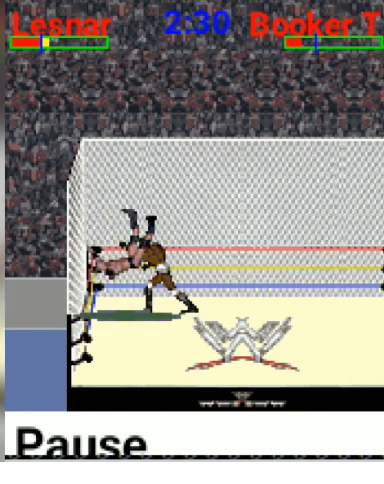
How to Play WWE SmackDown vs. Raw 2010 3D Java Game, Button by Button
Starting the Game
When the game opens, you will see the THQ logo. Press 5 to skip past it and get to the title screen. Press 5 again to enter the Main Menu.
You will see:
- Exhibition
- Career Mode
- Superstar Management
- Options
Use 2 and 8 to move the cursor up and down. Press 5 to select something. If you want to go back, press *****.
Setting Up a Match
Let us say you want a Normal Match. Go to Exhibition, press 5. Pick Normal Match, press 5 again.
Now you are at character select. Press 4 and 6 to scroll through the superstars. Press 5 to lock in your pick. The game will pick an opponent for you, or you can press 4 or 6 to choose one yourself.
Before you start, you can press # to change rules:
- DQ on or off
- Count out on or off
- Time limit (5 minutes, 10 minutes, or no limit)
When you are ready, press 5 on Start Match.
In-Match Controls
Moving Around
- 2, 4, 6, 8: Move your character. 2 moves down toward the bottom of the screen, 8 moves up toward the top rope, 4 is left, 6 is right.
- Double-tap any direction: Your character runs. Keep an eye on the little stamina bar under your name. When it is empty, you slow way down.
Strikes
- 5: Light strike. Punch or kick. Press it three times fast for a combo.
- 7: Heavy strike. Use this when your opponent is leaning against the ropes or stuck in the corner.
- 9: Alternate heavy strike or weapon attack if you are holding something.
Grapples Walk right up to your opponent and press 5 to grab them. Once you are locked up, press a direction plus 5 to do a move:
- 2 + 5: A slam or suplex (depends on your character)
- 4 + 5: Irish Whip to the left
- 6 + 5: Irish Whip to the right
- 8 + 5: A move that sends them toward the ropes
Running Attacks Double-tap a direction to start running, then press 5 for a running strike. If you press 5 while running straight at them, you might do a running grapple instead. It depends on the angle.
Reversals
- 0: This is the most important button in the entire game. When your opponent tries to grab you, a little icon flashes above your head. You have less than a second to press 0. If you hit it right, you shove them off and get a free opening. If you miss it, you eat the move.
I spent my first three matches getting destroyed because I was ignoring 0. Do not be like me. Watch for the flash.
Signatures and Finishers
- #: This is your special move button. When your momentum bar turns yellow and shows an “S”, you can hit a signature. When it turns red and flashes with an “F”, you can hit your finisher. You need to be standing close to your opponent when you press it.
Pinning and Kicking Out
- Stand next to a downed opponent and press 5 to pin them.
- If you are the one being pinned, rapidly press 5 to fill the kick-out meter. Here is the trick: do not just mash blindly. Watch the meter. When the marker hits the green zone, stop pressing. If you overshoot, you fail.
Submissions Grapple a downed opponent and hold 5 to lock in a submission. A struggle bar pops up. Mash 5 to make them tap. If you are trapped in one, mash 5 to escape.
Ropes and Turnbuckles
- 8 near the ropes: Your character climbs the turnbuckle.
- Once up there, press 5 to dive onto someone below.
- 2 near the ropes: Roll out of the ring.
Weapons
- 5 near a chair, ladder, or sledgehammer to pick it up.
- 5 to swing it. 7 or 9 for different angles.
- 5 near a downed opponent while holding a weapon to hit a special weapon move.
Tag Team Walk to your corner and press 2 or 8 to reach for the tag. Press 5 to make the tag happen. Your partner comes in with a little momentum boost, so try to tag when you are tired.
What I Actually Did in a Match I played Last Night
Opening the match: The bell rings and my opponent charges straight at me. I do not panic. I press 4 to sidestep, then immediately press 5, 5, 5 for a quick three-hit combo. They stagger. I walk up and press 5 to grapple, then 2 + 5 to slam them. Now I am in control.
Reversing a grapple chain My opponent grabs me. I see the reversal icon flash and I press 0. I break free. Here is something I learned the hard way: the AI usually tries to grab you again right after you reverse. So instead of striking, I wait a half-second. They reach for me again. I press 0 a second time. They whiff, and I get a free opening to hit my signature with #.
Hitting a finisher My momentum bar is flashing red. My opponent is holding their head, wobbling around. I do not press # from three feet away. I walk right up to them, almost touching, and then I press **#. John Cena hits the Attitude Adjustment. The first few times I tried this, I pressed it too far away and my character just stood there looking confused. Distance matters.
Escaping a steel cage I have beaten my opponent down until their health is yellow. I run to the cage wall and press 8. My guy starts climbing. I mash 5 to go faster. The opponent gets up and grabs my leg. I press 0 to kick them off, then keep mashing 5. At the top, I press 8 and 5 to drop down and win.
Ladder match I grab the ladder by pressing 5 next to it. I set it in the center of the ring. I climb with 8 and mash 5. My opponent starts climbing the other side. When they are one step below me, I press 5 to punch them. They fall. I keep climbing and grab the item.
Career Mode — How to Actually Win
Career Mode is a straight path. You fight ranked opponents, earn match ratings, and unlock title shots. Here is how I climbed it without getting stuck.
Start small. Do not jump straight to the WWE Championship. Pick the Intercontinental or United States title path first. The early opponents reverse less and hit softer. If you try to fight for the world title in your first five matches, the AI will reverse almost everything and you will rage quit.
Upgrade stats smart:
- If you are using a powerhouse like Batista, put everything into Strength and Grapple first. Stamina last.
- If you are using a brawler like Cena, balance Strength and Speed.
- If you are using a high-flyer like Rey, max Speed and Stamina first. You need to run and dive all match.
Get five-star matches easily The game rates your match 1 to 5 stars. To get a high rating, use different moves. Do not just grapple over and over. Mix in strikes, a top-rope dive, and a signature. Also, let your opponent kick out at two counts a couple times before the final pin. Near falls make the rating jump up fast.
Match Type Tips
Normal Match: Build your momentum, hit a finisher, pin. If you are losing, focus on reversals with 0 to steal momentum back.
Steel Cage: Do not climb while your opponent is at full health. They will pull you down every time. Beat them down to yellow health first, then climb.
Hell in a Cell: There is no escape. Use the walls. Irish Whip your opponent into the cell wall with 6 + 5 (or 4 + 5) for extra damage. It hurts them way more than a normal corner attack.
TLC/Ladder: Set the ladder early. Do not wait. The win is about positioning, not about having red momentum. Keep the ladder centered. If it tips, press 5 next to it to stand it back up.
Submission Match: Pick a powerhouse. Their submission holds drain the escape meter faster. If you pick a high-flyer here, you will be struggling to make anyone tap.
Tag Team: Tag in and out constantly. Your AI partner is not great at reversing. Keep your time in the ring short, do some damage, then tag out.
Wall splash in Hell in a Cell Whip your opponent into the cell wall, then immediately run at them and press 5. You will do a running wall splash that does signature-level damage without using any momentum. This is one of my favorite tricks.
Beginner Mistakes to Avoid
Ignoring stamina That little bar under your name is everything. When it is empty, you cannot run, your strikes get slow, and your reversals barely work. If your stamina is low, just walk for a few seconds. Do not run everywhere.
Hitting the finisher button too early Yellow momentum means signature. Red and flashing means finisher. I used to hit # the second I saw yellow and wonder why my character did a normal move. Wait for the red flash. Be patient.
Staying outside too long If you roll out of the ring, the referee counts fast. Get back in by count 6 or you will lose by count-out. I learned this the hard way in a steel cage match where I thought I was being smart.
Playing every character the same Big Show is slow and powerful. Rey Mysterio is fast and fragile. If you try to grapple nonstop with Rey, you will lose. If you try to dive off the ropes with Big Show, it will not end well. Respect the stats.
Jumping into hard match types too early Do not start with TLC or Hell in a Cell. Play Normal matches until you can reverse consistently. The ladder and cage add extra mechanics that will frustrate you before you understand the basics.
Comparison — WWE SmackDown vs. Raw 2010 vs. WWE SmackDown vs. Raw 2011
I played both of these back when they came out, and they feel pretty different.
2011 added some stuff. The roster got a little bigger. The animations look slightly smoother, especially when people run. The ladder physics feel a bit less stiff.
But 2010 plays better. The reversal timing in 2010 is tighter and more responsive. In 2011, it felt like there was a tiny delay, which made the game feel sluggish. 2010 also loads faster. Career mode in 2010 gets you into title matches quicker, while 2011 slows you down with extra text boxes and menus.
If I had to pick one to actually play for fun, I would choose 2010 every time. It is faster, the controls feel sharper, and it does not try to do more than the hardware can handle. 2011 is fine, but 2010 is the one I keep coming back to.
Conclusion
That is everything you need. The whole game really comes down to one thing: learn when to press 0. Reversals open up everything. They stop finishers, they break AI momentum, and they give you free damage. Once your thumb knows the timing, the rest is just practice.
Pick a brawler, play some Normal matches, and do not get mad if you lose the first few. This game rewards patience more than button mashing. Stick with it, and you will be climbing the cage and hitting finishers like it is second nature.
See you in the ring.