

Do you know that how good you are at this game and how far you can advance in the World Cup tournament highly depends on how well you understand the keypad controls?
Most people gave up on this game too early because they never figured out the timing. So today I will walk you through everything I learned while playing this on my Nokia Asha 311, button by button, mistake by mistake. Let’s get started.
Quick Game Info
| Attribute | Detail |
|---|---|
| Game Title | 2014 FIFA World Cup Brazil |
| Platform | Java ME (J2ME) |
| Publisher | EA Mobile |
| Reference Device | Nokia Asha 311 |
| Screen | 240 x 320 pixels (Portrait) |
| Game Modes | Exhibition, World Cup 2014, Penalty Shootout, Settings |
| Control Type | Numeric keypad (2-8-4-6-5-0-1-3-7-9) |
History & Background of 2014 FIFA World Cup Brazil Java Game
Back in 2014, not everyone had an Android smartphone. In markets like Nigeria, India, and across Southeast Asia, millions of us were still using feature phones with physical keypads.
EA Sports knew this, so they released a stripped-down but surprisingly faithful Java version of the official 2014 FIFA World Cup Brazil game.
This was not a simple reskin of FIFA 14.
It was built specifically for low-memory Java devices, with the official World Cup license, all 32 qualified teams, and the tournament structure baked in.
The graphics were pixelated, the commentary was non-existent, but the gameplay loop—pass, sprint, shoot, defend—was tight enough that you could actually lose yourself in a full tournament run. I spent an entire rainy weekend on my Asha 311 trying to win the trophy with Argentina, and I learned that this little game had more depth than people gave it credit for.
Key Features
Even on a 240×320 screen, EA managed to pack in several features that made this feel like a real World Cup product:
-
Official Tournament Mode: You pick a nation and play through the actual 2014 group stage and knockout bracket. The fixtures follow the real-world schedule.
-
All 32 Qualified Teams: From hosts Brazil to underdogs like Honduras and Iran. Each team had a simplified star rating instead of individual player stats.
-
Basic Tactics: Before a match, you could toggle between defensive, balanced, and attacking mindsets using the soft keys.
-
Penalty Shootouts: If a knockout match ended in a draw, you went straight to penalties with a dedicated mini-game control scheme.
-
Top-Down / Isometric View: The camera angle was locked, which actually made it easier to read the whole pitch on a tiny screen.
How to Play: A Practical Walkthrough
I am going to teach you exactly how I play this on my Nokia Asha 311. No emulator. No touch screen. Just the physical keypad.
Launching the Game and Navigating the Menu
When you power on your phone and locate the game icon, press 5 to open it. The EA Sports logo appears, followed by the 2014 World Cup Brazil title screen.
At the main menu, you will see options like “Play Now,” “World Cup,” “Penalty Shootout,” and “Settings.” Use 2 to move up and 8 to move down. Press 5 to select. Do not rush into “Play Now” if you want the full experience. Select World Cup using 8 to scroll down, then press 5.
Now you are on the nation select screen. I usually pick Brazil because they have the highest star rating.
Scroll through the list with 2 and 8. When you see Brazil highlighted, press 5. The game will ask you to confirm your choice. Press 5 again. You are now locked into Group A.
The Match Controls (Exact Button Map)
Before I walk you through a real match, memorize this. I keep it in my head like a reflex:
-
Movement: 4 (left), 6 (right), 2 (up/forward), 8 (down/backward).
-
Sprint: Hold 0 while pressing a direction. Your player will kick up dust and run faster.
-
Pass: Press 5 to make a short ground pass to the nearest teammate in the direction you are facing.
-
Through Pass / Lob: Press 1 to send a through ball ahead of a running teammate, or a lob over defenders if you are angled correctly.
-
Cross: Press 3 when you are near the sideline to whip the ball into the box.
-
Shoot: Hold 5 to charge a power meter, then release to shoot. Do not hold it too long.
-
Tackle: Press 5 when the opponent has the ball and you are close. Time it right or you will overshoot.
-
Slide Tackle: Press # when defending to commit to a slide. Risky, but effective on wet grass.
-
Switch Player: Press 7 or 9 to cycle to the defender nearest to the ball.
-
Goalkeeper Rush: Press ***** when the opponent is through on goal to charge the keeper out.
-
Pause: Press the left soft key (above the call button).
A Real Match: Brazil vs. Croatia
Let me tell you exactly what happened in my first group stage match. I was Brazil, the computer was Croatia.
At kickoff, the ball was at the center circle. I pressed 5 to pass to my midfielder. I wanted to build from the back, so I pressed 4 to move left, then 2 to push upfield. A Croatian striker started pressing me. I saw my winger open on the right. I pressed 6 to face him, then pressed 5 for a short pass. The ball reached him.
Now I was near the sideline. I pressed 2 to run forward, holding 0 to sprint. Their fullback stepped up. I had two choices: cut inside with 4, or cross. I saw Neymar making a run into the box. I pressed 3 to cross. The ball sailed in, but it was too close to the goalkeeper. The keeper caught it. That was my mistake—I crossed too early while Neymar was still behind the defender.
A few minutes later, Croatia attacked. They passed through my midfield. I panicked and pressed 5 to tackle with my center-back, but I was too far away. The striker ran past me.
I quickly pressed 7 to switch to my other defender, held 0 to sprint back, and pressed 5 right as he entered the box. Clean tackle. Ball out for a corner.
On the corner, they crossed it in.
I switched to my tallest defender with 9, positioned him under the ball with 2, and when the ball dropped, I pressed 5 to head it clear. The ball went to my midfielder. I immediately pressed 1 for a through pass to Neymar, who was sprinting past the defense.
The timing was perfect—he was just level with the last defender when the ball left my foot. He ran onto it. One-on-one with the keeper. I held 5 for about one second, released, and the shot went low into the corner. Goal.
That is how you play. You do not just press buttons. You read the situation, pick the right button, and accept that mistiming a through pass by half a second turns a goal into an offside.
Related Posts
Gameplay Screenshots

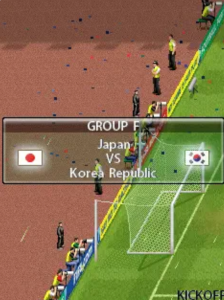
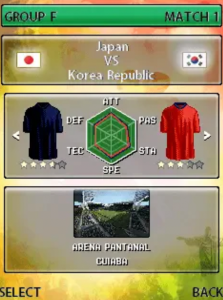

World Cup Tournament Progression
After the match, the screen shows your result and group standings. If you won, you get three points. A draw gives you one. If you finish in the top two of your group, you advance to the Round of 16.
Between matches, you cannot change your squad much—the Java version keeps it simple. But you can adjust your tactic before the next game. If you are facing a strong team like Germany in the knockout stage, press the left soft key before the match, go to tactics, and select “Defensive” using 2 and 8, then confirm with 5. This makes your team drop back and absorb pressure.
If a knockout match ends in a draw after regular time, you go to penalties. In the shootout, use 4 and 6 to aim your shot left or right, then press 5 to shoot. When you are the goalkeeper, watch the striker’s hips—press 4 or 6 to dive in that direction, and 5 to attempt the save. I once beat Spain in the semifinals because I dived right three times in a row by reading their pattern.
Beginner Mistakes to Avoid
I made all of these mistakes so you do not have to.
1. Holding the Shoot Button Too Long When you hold 5, the power meter fills up fast. New players get nervous and hold it until it hits maximum. The ball always goes over the bar.
My rule: for shots inside the box, hold 5 for exactly one second and release. For long shots, hold for one and a half seconds. Practice this timing.
2. Sprinting Everywhere: Holding 0 drains your players’ stamina. By the 70th minute, your team will be slow and useless. Use 0 only when you have open space ahead or when you need to close a defensive gap. In tight midfield battles, walk with 2-4-6-8 and keep your energy.
3. Blind Passing Do not press 5 just because you are under pressure. I used to do this when a defender rushed me. The pass would go straight to an opponent, and three seconds later, the ball was in my net. If you have no safe option, use 1 to lob the ball toward the sideline, or hold 0 and run into space with 4 or 6.
4. Neglecting Player Switching New players defend with whatever player the game gives them. You must use 7 and 9 to manually select the defender who is closest to the ball carrier.
If you chase with a midfielder who is far behind, you leave gaps. Switch, cut the passing lane, then press 5 to tackle.
5. Ignoring the Radar The mini-map at the bottom of the screen shows you where everyone is. Before I make a through pass with 1, I glance at the radar to confirm my striker is actually running.
If he is standing still, the through pass will go to the goalkeeper. Check the radar. It is your best friend.
6. Sliding Too Much Pressing # for a slide tackle feels satisfying, but if you miss, your defender is on the ground for two seconds. That is enough for a striker to score. Use standing tackles with 5 first. Only slide when you are sure you will hit the ball.
Comparison with a Game I Played: Real Football 2012
Before I found this FIFA World Cup game, I was obsessed with Real Football 2012 by Gameloft on the same Nokia Asha 311. Both are Java football games, but they feel completely different.
Real Football 2012 was faster.
The players moved like they were on ice, and you could score from thirty yards out by just pressing 5 with full power. It was arcade fun, but it got repetitive. The AI defenders in Real Football 2012 were also very passive—they would let you run past them if you held 0.
2014 FIFA World Cup Brazil is slower and more tactical. The passing requires more precision. You cannot just sprint through the middle; you have to work the ball wide, cross with 3, or thread a perfect through pass with 1.
The AI actually closes you down. I remember playing Real Football 2012 and winning every match 5-0. In FIFA World Cup Brazil, I lost my first group game against Mexico because I tried to play the same arcade way. I had to adapt.
One thing I missed from Real Football 2012 was the club team variety. FIFA World Cup only has international squads, so after you win the trophy, there is less replay value unless you try a weaker nation. But for pure tournament atmosphere, FIFA wins. The knockout bracket structure, the penalty shootout tension, and the fact that you cannot just overpower every opponent made winning the trophy on my Asha 311 feel like an actual achievement.
Conclusion
That is everything you need to master the 2014 FIFA World Cup Brazil Java game. Pick your nation, learn the buttons, respect the stamina system, and play with patience.
It is not about fancy skills—it is about passing at the right time, switching defenders before it is too late, and keeping your nerve in penalty shootouts. Win that trophy. Your Nokia can handle it.
