

Back in 2008, mobile gaming was not about app stores, battle passes, or always-online requirements. Most of the time, i can remember, i always wait for that loading bar to fill on a 2-inch screen, and discovered that my phone could run a racing game with licensed Ferraris, real cities, and speed blur effects that made your jaw drop. That was the magic of Java mobile gaming, and Gameloft was the undisputed king of that era.
I spent countless lunch breaks and bus rides glued to this game. Not because I had nothing better to do, but because Asphalt 4: Elite Racing was genuinely addictive.
The sense of speed was unmatched for a feature phone game. The vehicle roster was stacked with dream machines. And the career mode had that perfect “just one more race” pull that kept me pressing 5 to continue at 2 AM.
This guide isn’t a generic control list you could find anywhere. I’m going to walk you through exactly how this game works — menu by menu, button by button, scenario by scenario — based on real play experience.
Asphalt 4: Elite Racing Java Game at a Glance
| Attribute | Details |
|---|---|
| Developer | Gameloft |
| Release Year | 2008 |
| Platform | Java ME (J2ME) mobile phones |
| Genre | Arcade racing |
| Game Modes | Career, Quick Race, Cop Chase, Multiplayer (Bluetooth) |
| Control Scheme | Numeric keypad (2/4/6/8 for movement, 5 for select/action, * and # for special functions) |
| Licensed Vehicles | Yes — Ferrari, Lamborghini, Aston Martin, Ducati, and more |
| Track Locations | Paris, Los Angeles, Dubai, Shanghai, New York, and others |
History & Background
The Asphalt series debuted in 2004, but by the time Elite Racing arrived in 2008, Gameloft had perfected the formula for mobile arcade racing.
This was the pre-iPhone App Store era — Nokia, Samsung, Sony Ericsson, and Motorola ruled the market. Games had to run on devices with 128×160 screens up to 240×320, with limited memory and no dedicated graphics chips.
Yet Asphalt 4 pushed those boundaries. It introduced 3D-rendered vehicles with actual brand licenses, something rare for Java games. The nitro system was refined from Asphalt 3.
The cop chase mechanic added tension that pure racing lacked. And the career structure — tiered events with increasing stakes — gave players a reason to keep coming back beyond just beating lap times.
For many players, this was their first exposure to vehicles like the Ferrari F430, Lamborghini Gallardo, or Aston Martin DB9. The game didn’t just let you race them — it made you earn them through skill and smart progression. That combination of aspiration and accessibility is why it still holds a special place in mobile gaming history.
Game play

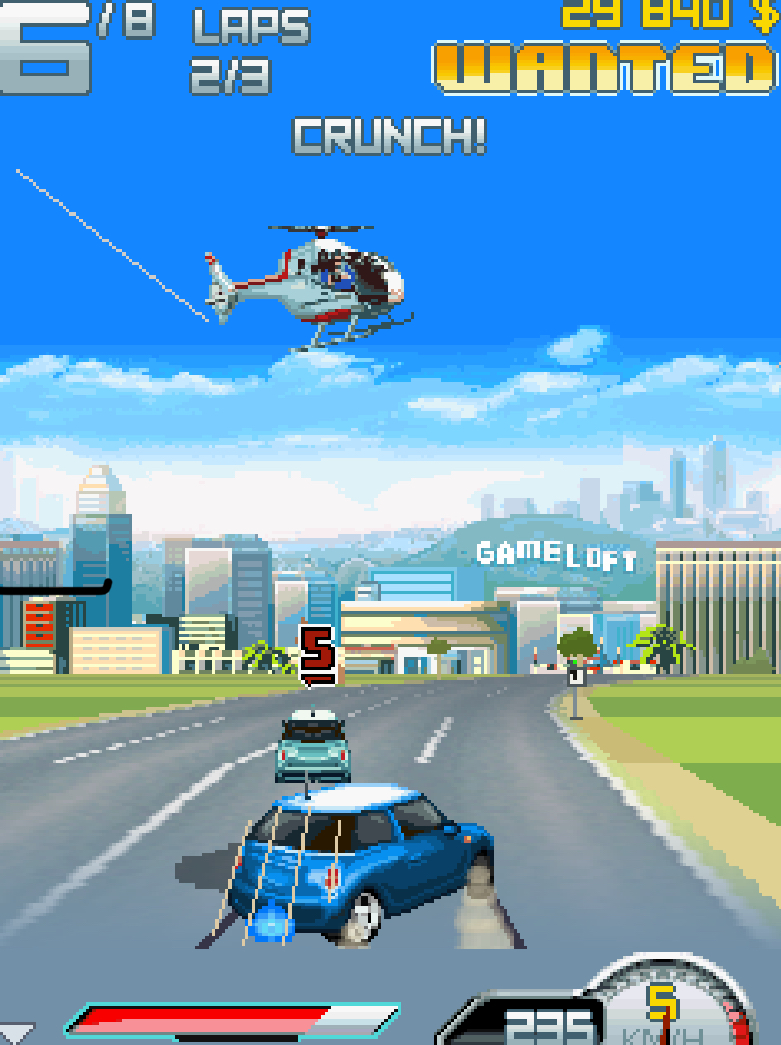
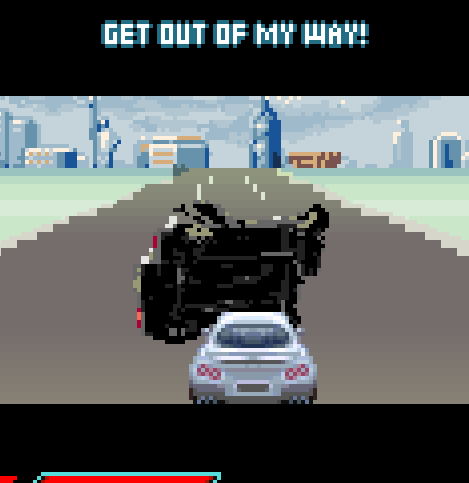
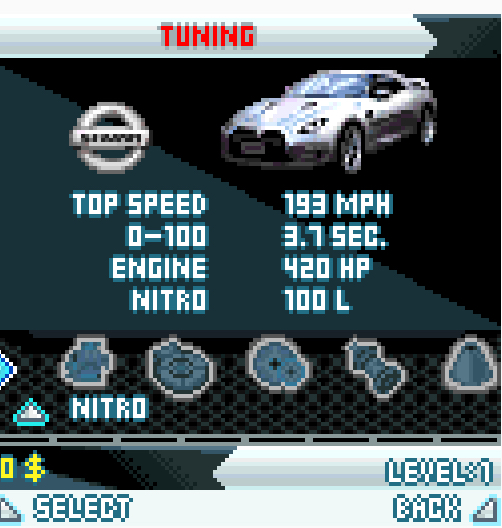
Key Features Breakdown
Licensed Vehicle Roster
The garage in Asphalt 4 isn’t just a collection of generic sports cars. Every vehicle is a real-world machine with distinct stats and handling characteristics. You’ll find Ferraris, Lamborghinis, Aston Martins, Ducati superbikes, and more. Each vehicle class behaves differently — bikes are nimble but fragile, supercars are fast but harder to control, and GT cars offer balance.
Global Track Locations
The game takes you through recognizable cityscapes — Paris with its tight corners and landmarks, Los Angeles with wide boulevards, Dubai with its modern highway stretches, Shanghai’s neon-lit streets, and New York’s dense urban grid. Each location isn’t just a visual skin; the track layout fundamentally changes how you approach racing.
Nitro Boost System
Nitro isn’t unlimited. You earn it through drafting, clean driving, and performing stunts. Managing your nitro meter separates good players from great ones. Burn it all on the straight and you’ll have nothing for the final corner where you actually need it.
Crash Physics & Recovery
Unlike sterile modern racers, Asphalt 4 punishes wall contact. Hit a barrier at speed and you’ll lose precious seconds watching your car tumble and reset. Learning to avoid walls while maintaining aggression is a core skill.
Career Progression & Economy
Cash is earned by winning events and performing well. You spend it on vehicle purchases and upgrades. The economy is tight enough that reckless spending will lock you out of events you need to progress. Strategic purchasing is essential.
Unlockables & Secrets
Hidden vehicles, bonus cash events, and alternate paint schemes reward exploration and mastery. Some of the best machines in the game aren’t available in the shop initially — you have to earn them.
Complete Vehicle Roster & Stats Analysis
Tier 1 — Starter Vehicles
| Vehicle | Type | Top Speed | Acceleration | Handling | Nitro | Notes |
|---|---|---|---|---|---|---|
| Mini Cooper S | Car | Low | Medium | High | Low | Surprisingly good for early tight tracks. Don’t overlook it. |
Tier 2 — Entry Sports
| Vehicle | Type | Top Speed | Acceleration | Handling | Nitro | Notes |
|---|---|---|---|---|---|---|
| Nissan 350Z | Car | Medium | Medium | Medium | Medium | Solid all-rounder. Good first purchase. |
| Ducati Monster | Bike | Medium | High | High | Low | Excellent acceleration, but crashes hurt more. |
Tier 3 — Performance Machines
| Vehicle | Type | Top Speed | Acceleration | Handling | Nitro | Notes |
|---|---|---|---|---|---|---|
| Aston Martin V8 Vantage | Car | High | Medium | High | Medium | Great handling for technical tracks. |
| Lamborghini Gallardo | Car | Very High | High | Medium | High | Fast but requires skill to control. |
Tier 4 — Elite Supercars
| Vehicle | Type | Top Speed | Acceleration | Handling | Nitro | Notes |
|---|---|---|---|---|---|---|
| Ferrari F430 | Car | Very High | Very High | High | High | Arguably the best all-around vehicle. |
| Koenigsegg CCX | Car | Extreme | Extreme | Low | Very High | Top speed king, but a handful in corners. |
Vehicle Selection Strategy
Don’t just buy the most expensive car you can afford.
I learned this the hard way when I purchased the Koenigsegg CCX early and couldn’t control it through Shanghai’s tight sections. Match your vehicle to the track type:
-
Tight city tracks (Paris, New York): Prioritize handling and acceleration over top speed.
-
Highway tracks (Dubai, LA): Top speed and nitro efficiency matter most.
-
Mixed tracks: Use balanced vehicles like the Ferrari F430 or Gallardo.
Track-by-Track Guide & Shortcut Atlas
Paris
Layout: Tight corners, narrow streets, landmark-heavy. Key Shortcut: After the first long straight, there’s a sharp right that looks like a dead end.
Press 6 to turn in — it’s a narrow alley that skips a hairpin and drops you near the Eiffel Tower section. Risk: The alley is tight; hit the walls and you lose more time than you save.
Los Angeles
Layout: Wide boulevards, long straights, gentle curves. Key Shortcut: None major, but use the wide roads to draft behind opponents. The final stretch has a hidden ramp on the right side — press 6 near the billboard to hit it. You’ll get air time and a nitro recharge.
Dubai
Layout: Modern highways, sweeping curves, minimal traffic. Strategy: This is a top-speed track. Use your fastest vehicle. The highway section has a divider you can weave through — press 4 or 6 to slalom and build nitro through clean passes.
Shanghai
Layout: Neon streets, tight corners, elevation changes. Key Shortcut: Near the midpoint, there’s a split path. The left route looks longer but has a jump that recharges nitro. The right is shorter but no jump. I always take the left with a bike or high-handling car.
New York
Layout: Dense grid, 90-degree corners, heavy traffic. Strategy: Braking discipline is everything here. I used to slam walls constantly until I learned to tap 2 (brake/reverse) briefly before each corner, then immediately accelerate out. The final bridge section rewards early nitro deployment.
Asphalt 4: Elite Racing Java Game Mode
Career Mode
The backbone of Asphalt 4. Structured in tiers with increasing difficulty and vehicle requirements. Each tier has multiple event types — standard races, time trials, cop chases, and duel events.
Progression Tip: Don’t rush to the next tier. Replay earlier events to farm cash if you’re struggling. The difficulty spike between Tier 2 and Tier 3 is real — I hit a wall until I upgraded my Nissan 350Z’s acceleration stat.
Quick Race
Free play any unlocked track with any owned vehicle. Perfect for practicing shortcuts without career stakes.
Cop Chase / Vigilante Mode
You’re either escaping police or playing as the pursuer.
The mechanics shift here — raw speed matters less than maneuvering. When escaping, I always save my nitro for when the cops get close, then press * to blast away at the last second.
Multiplayer (Bluetooth)
Two-player local races via Bluetooth connection. Both players need the game installed. The host presses 5 to create a room; the client searches and joins. There’s noticeable latency, so aim slightly ahead when trying to ram your opponent.
How to Play: Step-by-Step Menu Navigation & Controls
From Launch to Your First Race
When you boot the game, the Gameloft logo appears, followed by the Asphalt 4 title screen. Press 5 to continue past the title.
You’re now at the Main Menu. Here’s what you see and what to do:
-
“Career” is highlighted by default at the top.
-
Press 8 to move down through: Career → Quick Race → Multiplayer → Options → Help → Exit.
-
Press 2 to move back up.
-
Press 5 to select whatever is highlighted.
Select “Career.” The game loads your profile (or creates a new one if first time).
You’re now in the Career Hub. You see your current cash, career completion percentage, and available events. Press 6 to move right through the event list, Press 4 to move left. Events you can’t enter yet are grayed out.
Select an available event with 5. The game shows the event details — track, laps, opponents, and any vehicle restrictions.
Press 5 again to enter vehicle selection. You see your owned vehicles. Press 6 to scroll right through your garage, Press 4 to scroll left. Stats display at the bottom.
Press 5 to confirm your vehicle. The game asks “Start Race?” — press 5 one more time. The countdown begins.
In-Race Controls & Real
Here are the exact controls and how I use them in actual gameplay situations:
| Action | Button | When to Use |
|---|---|---|
| Accelerate | 8 | Hold constantly during straights. Release briefly before sharp turns. |
| Brake/Reverse | 2 | Tap before corners. Hold if you completely miss a turn. |
| Steer Left | 4 | Hold through left corners. Tap for minor corrections. |
| Steer Right | 6 | Hold through right corners. Tap for minor corrections. |
| Nitro Boost | * | Deploy on straightaways after corners, or to escape cops. |
| Handbrake/Drift | # | Initiate drifts in tight corners. |
| Pause | Left Soft Key | Access pause menu. |
The Perfect Launch At the start of every race, the countdown shows 3-2-1-GO. Do not press 8 before “GO” appears.
The moment “GO” flashes, press and hold 8 immediately. If your timing is perfect, you get a boost start. I practiced this ten times in Quick Race until I could nail it consistently. A bad start puts you behind AI that rubberbands aggressively.
Related Posts
How I Navigated a Sharp Right in Paris
I’m approaching a 90-degree right corner at high speed in my Lamborghini Gallardo. Here’s my exact sequence:
-
Release 8 about one second before the corner.
-
Tap 2 once to scrub speed.
-
Press and hold 6 to turn in.
-
As I hit the apex, press # to initiate a brief drift.
-
The moment I’m pointing at the exit, press 8 again while still holding 6.
-
Once straight, **press *** to deploy nitro down the next straight.
If I brake too late, I hit the outside wall and lose 3-4 seconds. If I don’t drift, the Gallardo understeers into the barrier. This sequence took me multiple attempts to internalize.
How I Escaped Police in Cop Chase Mode
Two police cars are behind me on the Dubai highway. My nitro meter is half full. One cop pulls alongside on my left.
-
I press 4 to swerve left, forcing him toward the center divider.
-
He backs off slightly. The second cop is still behind.
-
As we approach a gentle right curve, I press 6 to take the inside line.
-
The cop takes the outside and loses ground.
-
I see a straight opening ahead. **I press and hold *** — nitro deploys, and I’m gone.
How I Recovered from a Crash
I hit a wall in Shanghai and my Ferrari is tumbling. The camera resets. Immediately press 8 the moment control returns. Do not wait to orient yourself — the AI doesn’t pause. I’ve lost races by hesitating for even a second after crashes.
Using a Shortcut I’m in New York approaching the known shortcut alley. I need to hit it at the right angle.
-
Release 8 slightly before the turn-in point.
-
Tap 2 once.
-
Press 6 firmly to enter the alley.
-
Inside the alley, tap 4 and 6 alternately to thread between dumpsters.
-
Exit the alley, press 8, then *** for nitro down the cleared section.
If I enter too fast, I clip the alley wall and the shortcut becomes a trap. I always enter at 70% speed maximum.
Final Lap, Final Corner, Close Race
I’m in 2nd place entering the final corner of the Paris track. The leader is one car-length ahead. My nitro is full.
-
I don’t use nitro yet — entering the corner with nitro on causes oversteer.
-
I take the inside line: press 4, tap 2, coast through the apex.
-
On exit, press 8 and immediately ***.
-
The nitro blast on the short final straight gives me the speed to pull alongside.
-
At the finish line, I’m ahead by half a car length.
This is my most reliable last-lap strategy. I’ve won at least a dozen career events this way.
Post-Race Menu Flow
The race ends. Results display with your position, time, and cash earned.
-
Press 5 to continue past the results.
-
If you placed in the money, you see the cash added to your total.
-
You’re back at the Career Hub.
To upgrade a vehicle:
-
In Career Hub, press 2 to move up to “Garage” if available, or find the shop icon.
-
Press 5 to enter.
-
Press 6 to scroll through your owned vehicles.
-
Press 5 to select one.
-
Upgrade options appear: Engine, Handling, Nitro, etc.
-
Press 8 to move down through upgrade types.
-
Press 5 to purchase if you have cash.
-
Press the Right Soft Key to exit back.
Critical: Always upgrade your current primary vehicle before buying a new one. A fully upgraded Tier 2 car often beats a stock Tier 3 car. I wasted 40,000 in-game dollars learning this.
Advanced Driving Techniques
Nitro Management
Never use nitro in corners. The boost amplifies any steering input, causing spins. Deploy nitro only when your wheels are straight. I mentally divide each track into “nitro zones” — the straight after a corner, not the corner itself.
Drafting
Follow directly behind an opponent on long straights. After 2-3 seconds, you’ll see a visual effect and hear a change in engine tone. Your speed increases slightly, and you build nitro faster. Then slingshot past with a nitro burst.
Perfect Launch Timing
As mentioned earlier, the launch boost is essential. I count “1-Mississippi” after “GO” appears to time my 8 press. In practice, it’s closer to a reflex — watch for the visual flash, not the audio.
Air Control
After jumps (LA ramp, Shanghai left path), your vehicle is airborne. Do not press 4 or 6 in the air — you’ll land crooked and lose speed. Let the physics settle, then correct on landing.
Wall-Tap Risk Assessment
Sometimes grazing a wall is faster than braking heavily for a clean line.
In Dubai’s wide highways, a light wall-tap costs less time than slowing for perfection. In Paris, walls end your race. Learn which tracks forgive contact and which punish it.
Career Mode Progression Strategy
Optimal Path
Tier 1 is straightforward — complete all events with the starter Mini Cooper S. Save every dollar. Don’t upgrade the Mini; you’ll replace it soon.
At Tier 2, purchase the Nissan 350Z. It’s the best value-for-money vehicle in the game. Upgrade its acceleration and handling twice each. This car can carry you through most of Tier 2 and into Tier 3.
Before Tier 3’s cop chase events, ensure you have nitro upgrades. Escaping police without nitro is nearly impossible on higher difficulties.
Tier 4 is where vehicle choice matters most. Save for the Ferrari F430 rather than buying intermediate Tier 3 supercars. The F430 handles every track type well and has the stats to compete in Tier 4 events.
Money Farming
If you’re short on cash, replay Tier 2 “Time Trial” events. They’re short, predictable, and pay decently. I farmed the Paris Time Trial twelve times to afford my F430 upgrades.
Difficulty Spikes
Watch for these specific chokepoints:
-
Tier 2 → Tier 3 transition: Opponents suddenly have better vehicles. Upgrade before proceeding.
-
First Cop Chase in Tier 3: Requires nitro management. If you fail three times, farm cash for nitro upgrades.
-
Tier 4 opening events: Restricted to specific vehicle classes. Ensure you own at least one vehicle in each class before reaching this point.
Beginner Mistakes to Avoid
1: Burning Nitro on Straightaways Instead of Saving It for Exits
I see this constantly — players hit nitro the moment the road straightens, even when no one is near. Nitro is most valuable when it gets you out of a corner faster, not when you’re already at top speed.
Fix: Deploy nitro only after corner exits or when overtaking. Never on a straight where you’re already maxing speed.
2: Buying the First Expensive Car Instead of Upgrading
The Lamborghini Gallardo looks tempting in Tier 2. Don’t buy it yet.
A fully upgraded Nissan 350Z outperforms a stock Gallardo and costs less overall. Fix: Upgrade your current tier-appropriate vehicle fully before considering a new purchase.
A fully upgraded Nissan 350Z outperforms a stock Gallardo and costs less overall. Fix: Upgrade your current tier-appropriate vehicle fully before considering a new purchase.
3: Ignoring the Mini-Map and Missing Shortcuts
The mini-map in the corner shows the full track layout, including shortcut paths.
I missed the Paris alley shortcut for my first week of play because I never glanced at it.
Fix: Check the mini-map before every race. Note any paths that deviate from the main road.
4: Braking Too Late Before Turns
Asphalt 4’s physics punish late braking more than most arcade racers. You’ll understeer into walls and watch the AI sail past.
Fix: Brake earlier than feels necessary. Tap 2 one full second before the corner. You can always accelerate earlier on exit if you braked too soon.
5: Wasting Cash on Bikes for Car-Only Events
Bikes handle differently and are excluded from some events. I bought a Ducati early, then hit a Tier 3 event that required four-wheeled vehicles.
I had to farm cash for a car I should have owned already.
Fix: Maintain at least one competitive car and one bike, but prioritize car upgrades unless an event specifically favors bikes.
Comparison with a Game I Played Asphalt 4: Elite Racing Java Game
The game I spent almost as much time with was Need for Speed: Most Wanted (Java/Mobile version). Both released around the same era, both promised arcade racing thrills on feature phones, but they approached the genre differently.
Where Asphalt 4 Wins:
-
Vehicle variety: NFS:MW Java had a solid roster, but Asphalt 4’s inclusion of bikes and the sheer number of licensed brands felt more premium.
-
Track design: Asphalt’s global cities had more personality. NFS:MW’s tracks felt like generic highway loops by comparison.
-
Sense of speed: Asphalt 4’s speed blur and nitro effects created a more visceral sensation of velocity. Even on a 2-inch screen, you felt fast.
Where NFS:MW Java Wins:
-
Police AI: The cop chases in NFS felt more dynamic. Police would set up roadblocks, use spike strips, and coordinate better. Asphalt 4’s police are aggressive but predictable — once you learn their spawn patterns, they become manageable.
-
Damage modeling: NFS showed visible vehicle damage that affected handling. Asphalt 4’s crashes are binary — you’re either fine or tumbling, with no middle ground.
-
Atmosphere: NFS:MW had a grittier, more cohesive narrative tone. Asphalt 4 is pure arcade flash, which I enjoy, but NFS felt like an event.
Why I Keep Returning to Asphalt 4: Honestly, it’s the controls. The numeric keypad mapping in Asphalt 4 felt perfectly tuned — 8 for accelerate, 4/6 for steering, * for nitro. It became muscle memory. NFS:MW Java used a similar scheme but felt slightly less responsive in cornering.
When I’m on a bus and want a quick racing fix, Asphalt 4 is the one I boot up. The Ferrari F430 on the Dubai highway at sunset, nitro blazing, police in the rearview — that’s the moment this game was built for.
Why Asphalt 4 Still Holds Up
Modern mobile racers have better graphics, real multiplayer, and infinite content updates. But they’ve lost something Asphalt 4 had in spades: purity. No energy systems.
No loot boxes. No always-online requirements. Just you, your phone, and a full career mode that respects your time.
The tactile feedback of pressing physical buttons matters more than people admit. Touchscreen racers often suffer from imprecise steering inputs and accidental brake taps. With Asphalt 4 on a keypad, every press is deliberate. You can feel the rhythm of accelerate-brake-turn-nitro without looking at your hands.
The progression system is honest too. You earn cash, you buy cars, you win races. There’s no artificial difficulty spike designed to push microtransactions — because microtransactions didn’t exist in Java games. The difficulty comes from your own skill development, not from a monetization algorithm.
Conclusion
Asphalt 4: Elite Racing isn’t just a nostalgic relic — it’s a masterclass in mobile arcade racing design. The vehicle roster rewards ambition. The tracks reward memorization.
The career mode rewards persistence. And the controls, once internalized, become an extension of your reflexes.
Start with the Mini Cooper S. Master the Paris shortcuts. Save for that Nissan 350Z. Upgrade strategically.
Learn when to nitro and when to conserve. And when you finally unlock the Ferrari F430 and take it flat-out through Dubai at sunset, you’ll understand why this game earned its “Elite Racing” subtitle.

I love all action games on this site