

Do you know that how good of a player you are in Derek Jeter Pro Baseball 3D 2007 and how often you win or lose a match highly depends on how well you understand the controls and timing?
Back in 2007, mobile baseball games were finally starting to feel like real baseball, and this game was one of the titles that proved your phone could deliver a genuine 3D sports experience—not just a pixelated afterthought.
I spent hours with this game back in the day, and honestly, it still holds up as one of the most satisfying mobile baseball simulations ever made.
The combination of tight controls, actual 3D graphics on Java ME phones, and the Derek Jeter license gave it a legitimacy that most mobile sports games lacked. But here’s the thing: the game never really explained how to play it well. The in-game help was bare-bones, and most of us learned by trial and error.
So today, I’m going to walk you through everything—from the moment you launch the game to the advanced techniques that separate average players from ones who can pitch a shutout or hit for the cycle. Let’s get started.
Quick Facts Table
| Attribute | Detail |
|---|---|
| Game Title | Derek Jeter Pro Baseball 3D 2007 |
| Platform | Java ME (J2ME) Mobile Phones |
| Genre | Sports / Baseball Simulation |
| Release Year | 2007 |
| Developer | Gameloft (published under license) |
| Game Modes | Exhibition, Season, Playoffs, Home Run Derby |
| Perspective | 3D Behind-the-Player |
| Key Feature | Official MLB license with Derek Jeter as cover athlete |
| Controls | Full numeric keypad (2-8-4-6-5 + soft keys) |
Gameplay

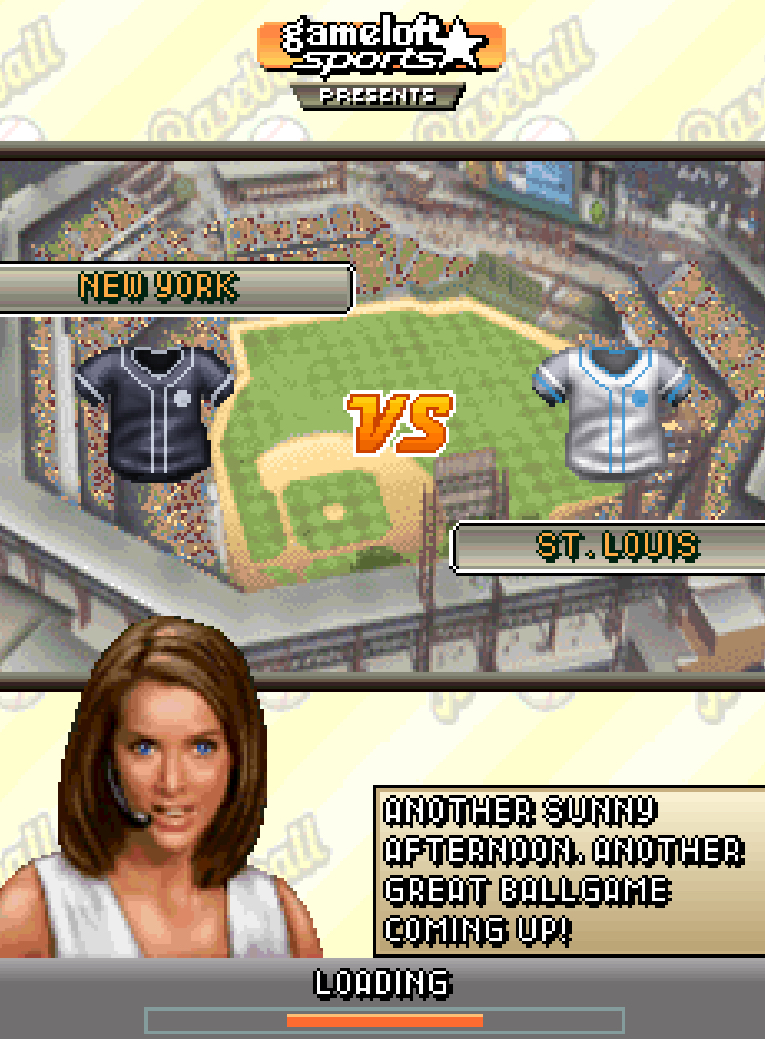
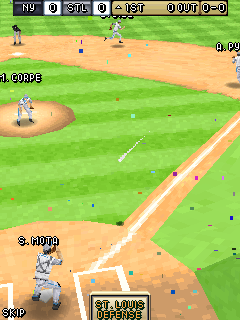
History & Background
In the mid-2000s, mobile gaming was undergoing a revolution. Phones were getting color screens, better processors, and enough memory to handle 3D graphics.
Baseball fans had been stuck with 2D, side-scrolling approximations of the sport for years—fun, but never feeling like the real thing.
Gameloft saw an opportunity. They secured the Derek Jeter license (Jeter was in the middle of his legendary career with the New York Yankees, fresh off multiple World Series wins) and built a game that actually tried to replicate the baseball experience in three dimensions on a 2-inch screen.
It wasn’t console-quality, but for a phone you carried in your pocket? It was remarkable.
The game featured real MLB teams, authentic stadium aesthetics, and multiple modes that gave you reasons to keep coming back.
The 3D engine allowed for dynamic camera angles during batting and fielding—something most Java games simply couldn’t do. It represented a bridge between the simple mobile games of the early 2000s and the sophisticated smartphone sports titles we take for granted today.
Key Features Breakdown
3D Graphics Engine
This wasn’t fake 3D or isometric trickery. The game rendered actual 3D models for players, bats, and balls. When you were at bat, the camera sat behind the catcher, giving you a genuine pitcher’s-eye view.
When fielding, you controlled a 3D player model running across a 3D field. On a 2007 feature phone, that was genuinely impressive.
Licensed MLB Elements
You weren’t playing as “New York” with generic players—you were playing as the actual New York Yankees, Boston Red Sox, Chicago Cubs, and the full roster of MLB teams available at the time.
Derek Jeter himself was featured prominently, and his stats reflected his real-world abilities: excellent contact, solid power, and elite fielding.
Multiple Game Modes
-
Exhibition: Jump into a single game immediately. Perfect for learning the ropes.
-
Season Mode: Play through a full MLB season, managing your team’s progress, tracking stats, and pushing for the playoffs.
-
Playoffs: Skip the regular season and go straight to October baseball.
-
Home Run Derby: Pure batting practice. No fielding, just you against the pitcher trying to launch as many home runs as possible.
Pitching & Batting Mechanics
The game used a timing-based system for both sides. As a batter, you had to read the pitch type and location, then time your swing perfectly.
As a pitcher, you selected your pitch, aimed it, and tried to outsmart the batter’s timing. This created a genuine cat-and-mouse dynamic that many mobile baseball games lacked.
Fielding System
Fielding was fully manual—you controlled the nearest fielder to the ball. The game didn’t hold your hand with auto-fielding.
If you misjudged a fly ball or took a bad route to a grounder, the ball would drop or roll past you. This made defensive plays genuinely satisfying when you executed them correctly.
Player Stats & Progression
In Season Mode, player performance mattered. Hot streaks and slumps affected how your team played. You could track batting averages, ERAs, home run totals, and more. This gave Season Mode real stakes—every at-bat counted toward something bigger.
Complete Controls Guide
Every command in this game uses your phone’s numeric keypad. Here’s the full breakdown:
Menu Navigation
-
2 – Move cursor up
-
8 – Move cursor down
-
4 – Move cursor left
-
6 – Move cursor right
-
5 – Confirm selection / Center action key
-
Left Soft Key – Back / Cancel / Secondary menu options
-
Right Soft Key – Pause / Access stats or substitutions during gameplay
Batting Controls
-
4 and 6 – Move batter left or right in the box (adjust positioning against inside/outside pitches)
-
5 – Swing the bat
-
2 – Bunt (hold before pitch arrives, release at contact)
-
8 – Power swing (slower timing but more power if you connect)
Pitching Controls
-
2, 4, 6, 8 – Select pitch type from your repertoire (fastball, curveball, slider, changeup—depending on pitcher)
-
Directional keys – After selecting pitch type, use 2, 4, 6, 8 to aim the pitch location in the strike zone
-
5 – Confirm pitch selection and begin delivery
-
5 again (timing-based) – Hit the sweet spot during the pitching meter for maximum velocity/accuracy
Fielding Controls
-
2, 4, 6, 8 – Move the controlled fielder in any direction
-
5 – Dive for a ball (use only when close—diving too early wastes the attempt)
-
1 – Throw to home plate
-
3 – Throw to first base
-
7 – Throw to third base
-
9 – Throw to second base / Cutoff throw
Base Running Controls
-
5 – Take a lead off the base (tap before pitch)
-
6 – Advance all runners
-
4 – Hold all runners (stop them from advancing)
-
8 – Slide into the next base (tap as you approach to avoid tag)
How to Play: Step-by-Step Practical Walkthrough
Launching & Main Menu
When you first start the game, you’ll see the title screen with Derek Jeter in his Yankees uniform and the game logo. Press 5 to continue past the splash screens.
You’ll arrive at the Main Menu. Use 2 and 8 to scroll through the options:
-
Exhibition
-
Season
-
Playoffs
-
Home Run Derby
-
Options
-
Help
Press 5 to select your mode. For your first time, I recommend starting with Exhibition to learn the flow without any long-term consequences.
Setting Up a Game
Once you select Exhibition, you’ll see the team selection screen. Use 4 and 6 to scroll through the available MLB teams.
Press 5 to confirm your team, then do the same for the CPU opponent.
Next, you’ll see the Pre-Game Lineup screen. Here you can view your starting pitcher and batting order. Use 2 and 8 to scroll through players and check their stats. Press Left Soft Key if you want to go back and change your team. Press 5 when you’re ready to start.
The game will load, and you’ll see the stadium with the first batter walking to the plate.
At-Bat: A Practical Inning
Let me walk you through exactly what happened when I played my first inning. I was batting as the Yankees, facing the Red Sox.
The pitcher wound up. The camera angle sat behind the catcher, and I could see the pitch coming. I got excited and pressed 5 immediately—swing and a miss. Strike one.
That was my mistake: I swung before the ball even reached the plate.
On the next pitch, I waited. I watched the ball leave the pitcher’s hand, tracked its movement, and pressed 5 just as it crossed the front edge of home plate. Contact! A line drive to left field. Base hit.
Here’s what I learned: timing is everything. The game doesn’t reward you for guessing. You have to watch the ball all the way in. If the pitch is low and away, you can use 6 to shift slightly toward the outside part of the plate before swinging—but don’t overdo it, or you’ll be vulnerable to inside pitches.
When I faced a curveball for the first time, I pressed 5 at my usual fastball timing and swung way too early. The ball broke down and away, and I looked silly. On the next curveball, I waited a half-second longer.
This time I made contact, but it was a weak grounder. The third curveball, I adjusted my timing again and drove it to the gap for a double.
Key lesson: Each pitch type has a different speed and break. Fastballs require quicker reactions. Curveballs and changeups need delayed timing. You have to read the pitch out of the hand and adjust.
Pitching: Working the Count
Now it was my turn to pitch. I was controlling a right-handed pitcher against a left-handed batter.
I pressed 6 to select a fastball, then used 8 to aim it low and away from the batter (down and to the left from my view).
I pressed 5 to confirm, and a timing meter appeared. I pressed 5 again when the meter hit the green zone—perfect execution. The batter swung and missed. Strike one.
Next, I wanted to set him up. I pressed 4 for a curveball, aimed it with 2 to the top-inside corner (high and inside), and confirmed with 5. The batter was looking for another fastball low and away.
He started his swing early, the ball broke down and in, and he missed by a foot. Strike two.
For the strikeout pitch, I went back to the fastball (6), but this time I aimed it with 2 high and tight. The batter, already worried about the curveball, couldn’t catch up to the velocity upstairs. Swing and miss. Strike three. Inning over.
What I did wrong initially: In my first game, I kept throwing fastballs down the middle because I was afraid of walking batters. Big mistake.
Related Posts
Good batters will crush pitches over the plate. You have to work the corners, change speeds, and keep the batter off-balance. Don’t be afraid to throw balls intentionally to set up a better pitch.
Fielding: Making the Big Plays
The Red Sox hit a ground ball up the middle. The game automatically switched control to my shortstop (Derek Jeter, fittingly). I pressed 6 to sprint right toward the ball. I reached it just as it was about to pass me, pressed 5 to field it cleanly, then immediately pressed 3 to throw to first base.
Out! A 6-3 putout. Felt great.
But then a batter hit a shallow fly ball to left field. The game gave me control of the left fielder. I pressed 8 to run back, but I misjudged the ball’s arc. I pressed 5 to dive, but I was too far away. The ball dropped in front of me for a single. That was on me—I should have positioned myself earlier instead of waiting to see where it landed.
Later in the game, a hard grounder came to my third baseman. I pressed 4 to move left, fielded it with 5, and had a choice: the runner was fast, so I pressed 3 to throw to first for the safe out instead of risking an error going for the lead runner at second.
Key insight: Fielding is about anticipation. Watch the batter’s stance and swing. If he pulls the bat hard, expect a grounder. If he gets under it, run back immediately. Don’t wait for the ball to land to start moving.
Managing a Full Season
In Season Mode, after each game you’ll return to a calendar screen. Use 2 and 8 to scroll through upcoming games.
Press 5 to play the next match.
Pay attention to your pitcher’s stamina. If your starter has low energy (shown in the pre-game screen), consider resting him. A tired pitcher throws slower and less accurately—you’ll notice your timing meter becomes harder to hit in the green zone.
You can also check team standings and player stats from the season menu. Use Right Soft Key to access these screens. Track your home run leaders and batting averages. If a player is in a slump (low average over multiple games), try moving him down in the batting order.
7. Pro Tips & Advanced Strategies
Tip 1: The Two-Strike Approach:
When you have two strikes, stop swinging for the fences. Use 4 or 6 to crowd the plate slightly, and focus on making contact with 5 rather than timing a power swing.
Put the ball in play and let your speed or the defense create an opportunity.
Tip 2: Pitch Sequencing Never throw the same pitch in the same location twice in a row.
If you throw a fastball inside, follow with a curveball away. If you go high with a fastball, come back low with a changeup. Batters (even CPU batters) start to pick up patterns. Keep them guessing.
Tip 3: The Intentional Walk Situation
With a dangerous hitter up and first base open, don’t be afraid to pitch around him. Aim your pitches with 2, 4, 6, 8 well outside the strike zone. Yes, you put a runner on, but you avoid the big inning.
Beginner Mistakes to Avoid
1: Swinging at Every Pitch
I see this all the time. New players press 5 on every pitch because they feel pressured. Don’t. Take pitches. Work the count. A walk is as good as a single in many situations. If the pitcher throws two balls outside the zone, force him to come into the strike zone where you can handle it.
2: Throwing to the Wrong Base
In the heat of the moment, it’s easy to panic and press 1 (home) when you should press 3 (first). Remember: the base numbers correspond to their position on the field. First base is 3, second is 9, third is 7, home is 1. Take a split second to think before you throw. A wrong throw leads to errors and extra bases.
3: Ignoring Pitcher Stamina
Your starter might be dealing through five innings, but if his stamina bar is low, he’s going to start hanging breaking balls and losing velocity on his fastball. Don’t be stubborn. Go to your bullpen. A fresh reliever with less raw talent is often better than a exhausted ace.
4: Not Adjusting Fielding Depth
With a power hitter at the plate, play your outfield deeper (8 to move back before the pitch). With a contact hitter or a bunt threat, play in shallow. The game doesn’t auto-adjust this—you have to manage it. I lost a game once because I played my outfield shallow against a slugger who hit three home runs over my head.
5: Forgetting to Save
Season Mode progress doesn’t auto-save after every game. After you finish a match and return to the season menu, make sure you see the save confirmation. If you close the game without saving, you’ll lose everything since your last save. I learned this the hard way after a 10-game winning streak vanished.
6: Power Swinging in Bad Counts
The 8 power swing is tempting, but it narrows your timing window significantly. Don’t use it with two strikes, and don’t use it against pitchers with high velocity. Save it for hitter’s counts (2-0, 3-1) when you’re looking for a specific pitch and can afford to miss.
7: Poor Base Running Decisions
Don’t try to stretch a single into a double unless you know the outfielder has a weak arm. Don’t steal third with two outs—the risk isn’t worth the reward. And never, ever get doubled off on a line drive.
If there’s a runner on first and less than two outs, make sure the line drive gets through before you take more than one step off the base.
Comparison with a Game I Played: MLB Power Pros
Before I wrap this up, I want to compare Derek Jeter Pro Baseball 3D 2007 Java game with another baseball game I spent serious time with: MLB Power Pros Java game.
Both games share a philosophy that baseball should be fun first, simulation second. They don’t overwhelm you with complex button combinations or hyper-realistic physics. Instead, they give you responsive controls and let your baseball IQ determine success.
Where Derek Jeter Pro Baseball 3D 2007 wins: Portability and accessibility. I could play a full nine-inning game on my commute, in a waiting room, or during lunch.
The controls were simple enough to master on a numeric keypad but deep enough that I never felt like I had “solved” the game. The season mode, while not as elaborate as console offerings, gave me a reason to keep my phone charged.
Where MLB Power Pros wins: Depth and presentation. MLB Power Pros had a full career mode, create-a-player, and a charming visual style that Derek Jeter’s game couldn’t match on mobile hardware. The console game also had more nuanced pitching and batting mechanics simply because it had more buttons to work with.
My personal take: If I had an hour to kill at home, I’d fire up MLB Power Pros. But if I had 20 minutes on a bus? Derek Jeter Pro Baseball 3D 2007 was my go-to.
There’s something special about a game that respects your time while still delivering a genuine sports experience. The fact that I could pull my phone out, play a meaningful baseball game, and put it away satisfied—that’s a design achievement that modern gacha-filled mobile sports games have largely forgotten.
Why This Game Still Matters
In 2026, mobile baseball games exist with photorealistic graphics, online multiplayer, and microtransaction-driven card collections. But Derek Jeter Pro Baseball 3D 2007 represents something those games often forget: focus.
This game didn’t push notifications at you. It didn’t ask you to watch ads for extra energy. It didn’t hide the best players behind paywalls.
You launched it, you played baseball, and you either won or lost based on your skill. That purity is rare now.
For retro gaming enthusiasts and baseball fans who want to understand where mobile sports gaming came from, this title is essential history. It proved that a phone could be a legitimate gaming device for sports fans, and it did so with a control scheme that anyone could learn but few could truly master.
Conclusion
Derek Jeter Pro Baseball 3D 2007 isn’t just a nostalgia trip—it’s a genuinely well-designed baseball game that rewards patience, timing, and smart decision-making.
Whether you’re trying to hit a walk-off home run, pitch a perfect game, or grind through a full season to the World Series, the fundamentals stay the same: watch the ball, think ahead, and execute with precision.
Apply the tips from this guide, avoid the beginner mistakes, and most importantly—enjoy the game. Mobile baseball was never better than this.
FAQ
What was the best team in the Derek Jeter Pro Baseball 3D 2007 Java Game?
The New York Yankees had the highest overall ratings, thanks in part to Derek Jeter being the cover athlete. But the Boston Red Sox and St. Louis Cardinals were also very strong.
How long does a full season take?
Depending on your play frequency, a full 162-game season can take several weeks of casual play. Exhibition games take 10-15 minutes each.
Is there a multiplayer mode?
No, the game is single-player only. You compete against CPU-controlled teams.
What made the 3D engine impressive for its time?
Most Java ME games in 2007 used 2D sprites or pre-rendered graphics. This game rendered real-time 3D player models, dynamic camera angles, and a 3D ball physics system—all on hardware with less processing power than a modern calculator.
