

If you have ever tried to play Asphalt: Urban GT on an old Java phone and found yourself bouncing off walls or running out of nitro at the worst possible moment, you are not alone. I spent an entire afternoon with this game on my Nokia 6230i — a classic Symbian S40 phone with the traditional D-pad, left and right soft keys, and that familiar numeric keypad — and I can tell you that this game rewards precision far more than brute speed. Most guides online just list features. They do not tell you what buttons to press, what order to press them in, or what actually happens when you are sitting on a bus trying to win a career race with a two-inch screen. That is exactly what I will do here. Let us get started.
First Boot: The Main Menu & What to Press
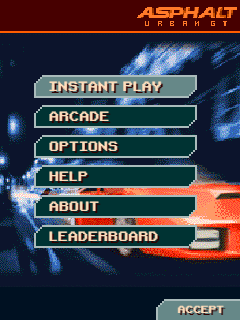
When you launch the game, you will see the Gameloft splash screen. Do not press anything yet. Let it load. Once the main menu appears, you will see five options stacked vertically: Quick Race, Career, Multiplayer, Options, and Help.
Use your D-pad to move the red cursor up and down. To select anything in this game, you press the Left Soft Key — that is the physical button directly below the screen on the left side. To go back, you press the Right Soft Key.
Now, here is what I learned the hard way. If you are new, do not click Quick Race first. It drops you into a random car on a random track with no context. You will not know the controls, and you will crash within ten seconds. Instead, move the cursor down to Career and press the Left Soft Key. This is where the game actually teaches you how to play through progression.
If you want to change the sound or control sensitivity first, go to Options. I recommend turning the music volume down one notch and keeping the sound effects high. The engine audio cues actually help you time your gear shifts and nitro bursts later.
Your Button Map: Controls on a Real Java Phone
Before you enter a race, you need to know exactly what each button does. On my Nokia 6230i, the layout is tight, and the D-pad is smaller than what you would find on a Samsung or Tecno from the same era. This means you cannot just mash directions. You have to tap.
- D-pad Up / Down / Left / Right: Steering and menu navigation.
- Left Soft Key: Brake and reverse when you are racing. Confirm and select in menus.
- Right Soft Key: Accelerate in-race. Back and cancel in menus.
- Center Select / OK button: Handbrake. Also activates your nitro boost when the gauge is full.
- * (Star) Key: Changes camera angle. Press it once to switch from behind-the-car to bumper view.
- # (Hash) Key: Resets your car if you are stuck against a wall. Do not abuse this.
One thing the in-game Help section does not tell you: on the Nokia 6230i, the D-pad is stiff. If you hold Left or Right for too long, your car will oversteer and spin. You must tap-tap-tap the direction instead of holding it. This is the single most important piece of hardware-specific advice I can give you.
Career Mode: A Step-by-Step First Race
Let us walk through your very first career race together. From the main menu, select Career. You will see a garage screen with your starter car. It is slow. It is ugly. But it is free. Press Left Soft Key to accept it.
Now you are on the city map. You will see a node glowing with a checkered flag. Move your cursor to it using the D-pad and press Left Soft Key to enter the race. Before the race starts, you will see a pre-race screen with your car stats and an Upgrade option. Do not upgrade yet. You do not have enough money, and the first race is easy enough to win stock.
Press Left Soft Key again to start. The loading screen gives you a tip. Most of them are generic, but pay attention to the ones about nitro — they matter.
The race starts with a countdown: 3, 2, 1, Go. Here is the trick. Do not hold the Right Soft Key (accelerate) before the countdown finishes. Wait until you see the word Go, then immediately press and hold it. If you press too early, your car stalls the launch and the AI opponents will leave you behind.
How to Race: Practical Gameplay from Start to Finish
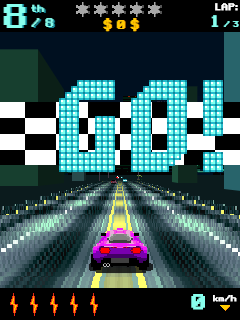
You are now on the track. The HUD shows your speed at the top, your position on the left, the lap counter, and a mini-map at the bottom. Your nitro gauge is that small bar next to your speed.
The Launch: If you timed your start correctly, you are moving. The first corner is usually a gentle right. Tap the Right direction on the D-pad once — do not hold it. Guide the car through the apex.
Cornering: This is where most people fail. When you see a sharp turn approaching — the kind where the road visibly bends — release the Right Soft Key (accelerate) about one second before the turn. Tap the Left Soft Key (brake) once, then tap the direction you need to turn. If it is a hairpin, tap the Center/OK button for a handbrake drift. Your car will slide. Counter-steer with the opposite direction on the D-pad to straighten out, then hammer the Right Soft Key again.
I learned this the painful way. In my first race on the Downtown track, I tried to take a 90-degree corner at full speed by just holding left. I slammed into the wall, lost three positions, and could not catch up because the starter car has terrible acceleration. The fix was simple: brake before the turn, not during it.
Nitro Management: Your nitro gauge fills when you drive cleanly, draft behind opponents, or perform near-misses with traffic. Once it is glowing, press Center/OK to activate it. Never use nitro in a corner. Never use it if a police roadblock is ahead. Use it on a long straight where you can see the road is clear. On the Nokia 6230i, the Center/OK button requires a firm press, so do not fumble for it mid-corner. Plan ahead.
Police Evasion: In later career races, police cars appear as red blips on your mini-map. If you see one approaching from a side street, do not panic-brake. Steer smoothly around them. If you hit a police car, you slow down massively and the AI will overtake you instantly. There is one alleyway on the Downtown track, just after the second bridge, where the police rarely follow. If you are being chased, duck in there.
Shortcuts: Some fences have a slight crack or a different color. These are breakable. You can drive through them. However, not all shortcuts are worth it. There is a shortcut through a park area on one track that looks tempting but has a tight chicane inside. I took it once, hit a tree, and lost five seconds. The rule is: only take a shortcut if you can see the exit clearly and you are already driving straight.
Finishing: Cross the line, and the results screen appears. You get cash and reputation points. If you placed first, you unlock the next node on the map. If you placed second or third, you still get money, but you must replay the race to advance. I recommend replaying the first race two or three times to build up cash before moving on. The early races are easy money, and the later ones punish you if your car is still stock.
Advanced Techniques & Hidden Mechanics
Once you have the basics down, here are the things the game does not explain in the Help menu.
The Wall-Tap Momentum Trick: On very tight city tracks, lightly grazing a wall without crashing will actually keep your momentum up compared to braking hard. I am talking about a feather-light tap. If you hear a small scrape sound but your car does not bounce, you did it right. This is useful on the Industrial track where the walls are close.
Drafting: If you drive directly behind an opponent for about two seconds, you will see small air lines appear around your car. This means you are drafting. Your nitro gauge fills faster, and you get a slight speed boost. Use this to slingshot past them on the next straight.
Hidden Unlock: Most players think the bonus car unlocks after beating the final boss race. It does not. It unlocks after you achieve a specific reputation milestone — I believe it is after your 15th career win. Keep racing, and check your garage periodically. It will just appear.
Economy Strategy: Do not buy visual upgrades. They do nothing. In the upgrade shop, always buy Engine first, then Tires, then Nitro. Handling upgrades are nice but unnecessary on the Nokia 6230i because the D-pad already limits how sharply you can turn.
Track-Specific Shortcut: On the Downtown track, after the first long straight, there is a broken fence on your left just before the tunnel. Drive through it. It skips the entire tight section inside the tunnel and drops you on the other side with a clear run to the finish line. I missed this for my first three races because the fence looks solid from a distance.
Multiplayer & Competition: Racing Real People
If you have a friend with a Java phone nearby, go to Multiplayer from the main menu. One person selects Host, the other selects Join. The Nokia 6230i uses Bluetooth for this, so make sure your phone’s Bluetooth is on and visible.
The lobby screen is simple. The host picks the track, and both players see a Ready prompt. Press Left Soft Key to confirm.
Here is a bug I ran into: if the joining player presses buttons during the loading screen, the game sometimes freezes on the host’s phone. Tell your friend to keep their hands off the phone until the race actually starts.
In multiplayer, the first corner is chaos. Experienced players will try to ram you into a wall to steal the racing line. Counter this by starting slightly to the left of the grid, braking a half-second earlier than usual, and cutting the apex cleanly while they bounce off each other. You will emerge in first place while they are recovering.
Also, do not spam nitro in a friendly lobby. It is considered bad manners, and more importantly, it makes you predictable. Save it for the final straight to steal the win.
Beginner Mistakes to Avoid
I made all of these mistakes so you do not have to.
Mashing the accelerator through every corner. This is the number one killer. Release the Right Soft Key before you turn. The game does not have grip upgrades strong enough to save you from physics.
Wasting nitro on the starting straight. The starting straight is usually short. You will hit a corner immediately and have to brake, wasting your boost. Save nitro for the longest straight on the track.
Ignoring the mini-map. That tiny map at the bottom shows police, traffic, and shortcut openings. Glance at it every few seconds. It is your radar.
Buying visual upgrades first. I spent my first 2,000 credits on a paint job. It did not make the car faster. I lost the next race because my engine was still stock. Buy performance first. Looks later.
Skipping the test drive. Before a career race, you can sometimes select Test Drive to learn the track layout. Do this on every new track. The in-game map does not show elevation changes or hidden walls. One lap of testing saves three laps of crashing.
Holding the D-pad too long. I mentioned this before, but it deserves its own bullet point. On the Nokia 6230i, holding a direction for more than half a second is almost always a crash. Tap to steer. Treat the D-pad like a trigger, not a joystick.
Comparison with a Game I Played: Need for Speed: Most Wanted (Java Version)
I also spent a lot of time with Need for Speed: Most Wanted on the same Nokia 6230i, and the two games feel completely different despite being in the same genre.
Physics Feel: Asphalt: Urban GT feels heavier. Your car has weight, and you feel the momentum when you brake. NFS: Most Wanted feels floatier, almost arcade-like. You can get away with reckless driving in NFS. In Asphalt, one bad corner can ruin your entire race.
Control Layout: In NFS: Most Wanted, nitro is mapped to the # key. In Asphalt, it is the Center/OK button. I personally prefer the Asphalt layout because the Center/OK button is easier to hit quickly with my thumb without looking down. The # key on the 6230i is awkwardly placed at the bottom right.
Career Structure: NFS uses a blacklist system where you challenge specific bosses. Asphalt uses an open city map where you pick races at nodes. I prefer Asphalt’s freedom. If one race is too hard, you can drive to a different node and earn money elsewhere. In NFS, you are stuck until you beat the blacklist rival.
Difficulty Curve: Asphalt is less forgiving early on. The first few races in NFS are nearly impossible to lose. In Asphalt, if you do not learn to brake before corners, you will place fourth or fifth consistently. However, once you master the controls, Asphalt becomes more satisfying because the AI actually races you instead of letting you win.
Verdict: For short commutes, I actually prefer Asphalt: Urban GT. The races are shorter, the tracks are more memorable, and the sense of speed is better on a small screen. NFS is great for longer sessions, but Asphalt fits the Java phone format perfectly.
Conclusion
That is everything you need to know. Launch the game, select Career, tap your D-pad gently, brake before corners, save your nitro for the straights, and replay early races to fund your engine upgrades. The Downtown shortcut through the broken fence is your secret weapon. Master these basics, and you will move from bouncing off walls to leaving the AI in your dust. Now power on that Nokia and race.

I so much love this game when i played it