

There’s nothing quite like a phone alarm going off at the wrong moment — during a meeting, in a movie theater, or at 6 AM on a Saturday you were supposed to sleep through. If you own a Nomi i220 Dual Sim Red, you’ve probably noticed something else too: this little keypad phone doesn’t work like a smartphone. There’s no swipe, no app grid, and no obvious “off” switch staring back at you.
That’s completely normal. The Nomi i220 is a classic button phone, and its alarm lives inside a simple menu that’s easy to miss if you’ve never dug around in it. The good news? Turning the alarm off takes under a minute once you know where to look.
In this guide, I’ll walk you through exactly where the alarm settings hide on the Nomi i220, how to switch an alarm off (and how to stop one that’s already ringing), plus a few extra tricks most owners never learn.
What you’ll learn:
- How to find the Alarm menu on your Nomi i220
- How to switch off an alarm so it never rings again
- How to stop a ringing alarm in seconds (and avoid the snooze trap)
- How to tell at a glance whether an alarm is still active
Why Bother Learning This?
You might be tempted to just yank the battery or mute the phone every time it blares. But that only works until the phone turns itself back on for the alarm — yes, most keypad phones like the i220 will actually power themselves on to ring a scheduled alarm, even if you switched the phone off.
Learning the proper way takes one minute and saves you from:
- Embarrassing public ring-outs when an old alarm you forgot about fires off
- Missed mornings, because you deleted an alarm you actually needed
- Frustration, from fighting a menu system that isn’t as cryptic as it looks
Think of it this way: the i220 was built for simplicity. Once you learn its menu logic, everything — alarm included — becomes second nature.
Step 1: Open the Main Menu
Press the Menu key (the center button on the navigation pad) from the home screen.
This takes you into the phone’s main menu — a grid or list of small apps like Messages, Contacts, Call log, and Settings.
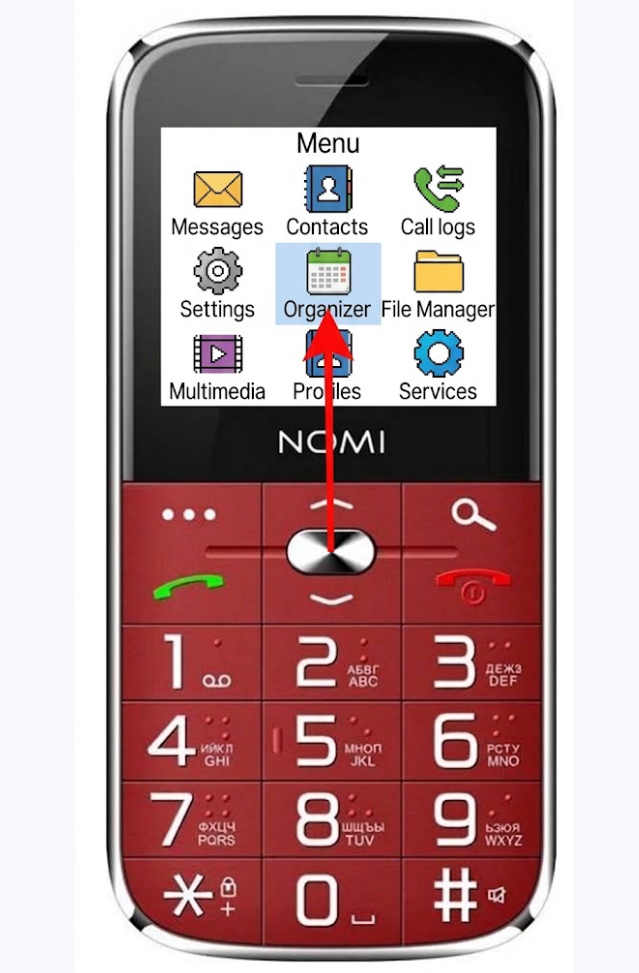
Can’t find the Menu key? On the Nomi i220 it’s the round OK button in the middle of the directional pad, directly below the screen. Pressing it once from the home screen always opens the menu.
Step 2: Find the Organizer
Scroll down to “Organizer” using the navigation pad, then press OK to open it.
The Organizer is where the Nomi i220 keeps its small built-in tools — things like the Alarm clock, Calculator, and Stopwatch. Don’t confuse it with “Settings”; the alarm lives here, not there.
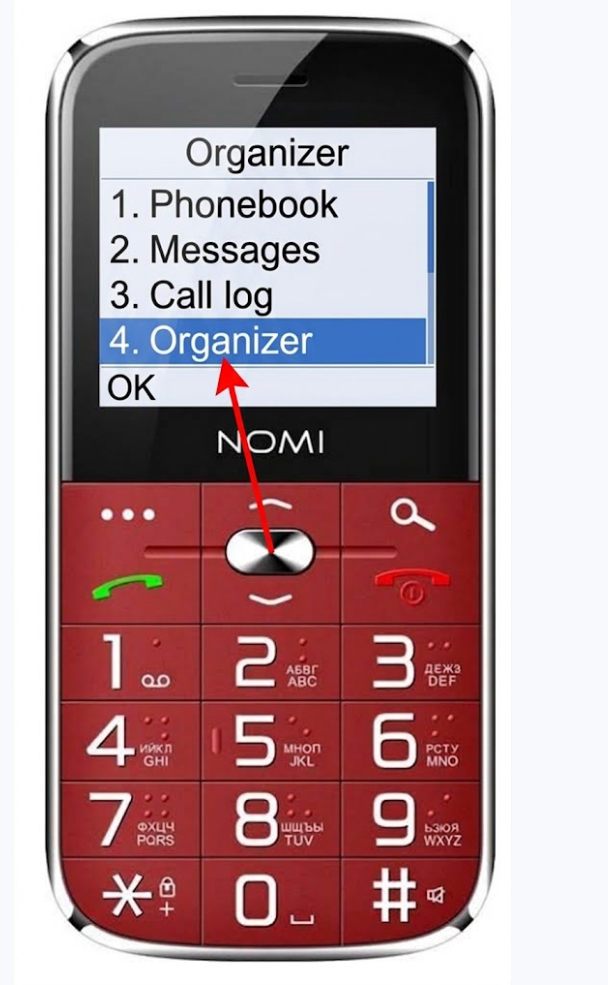
Tip: If you scroll past it, just keep pressing the down arrow — the menu wraps around, so you’ll come back to the top eventually. The Alarm clock entry usually sits near the top of the Organizer list.
Step 3: Open the Alarm Clock
Select “Alarm clock” and press OK.
You’ll now see the list of alarms saved on the phone. If you’ve never set one, there will be a single default entry (often showing a time like 07:00). If you’ve set several, they’ll all be listed here.
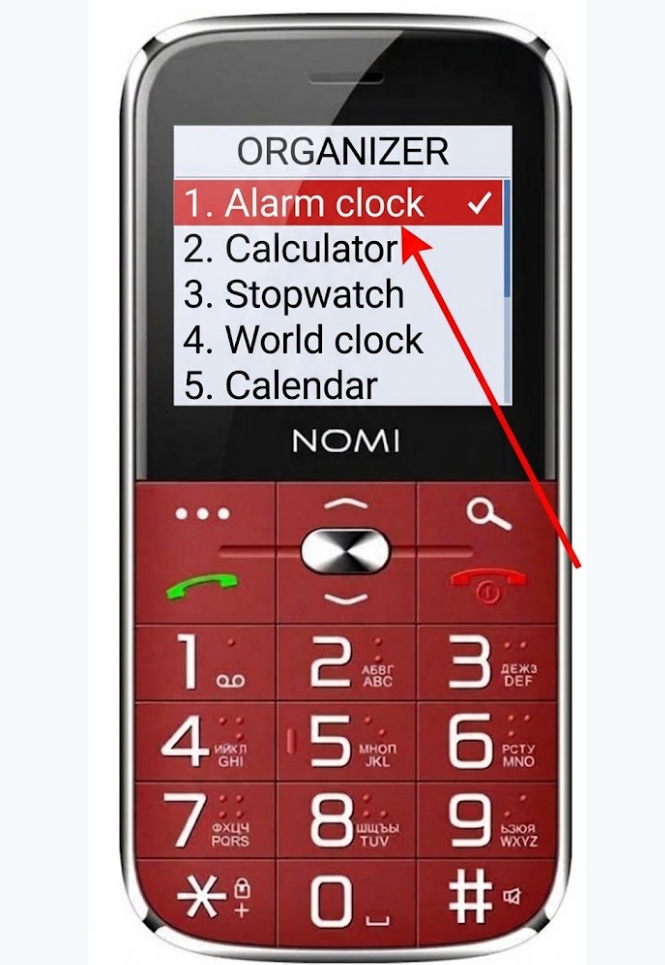
Note: A small bell icon next to an alarm means it’s currently switched ON. Alarms without the bell are already off — no need to touch those.
Step 4: Select the Alarm You Want to Silence
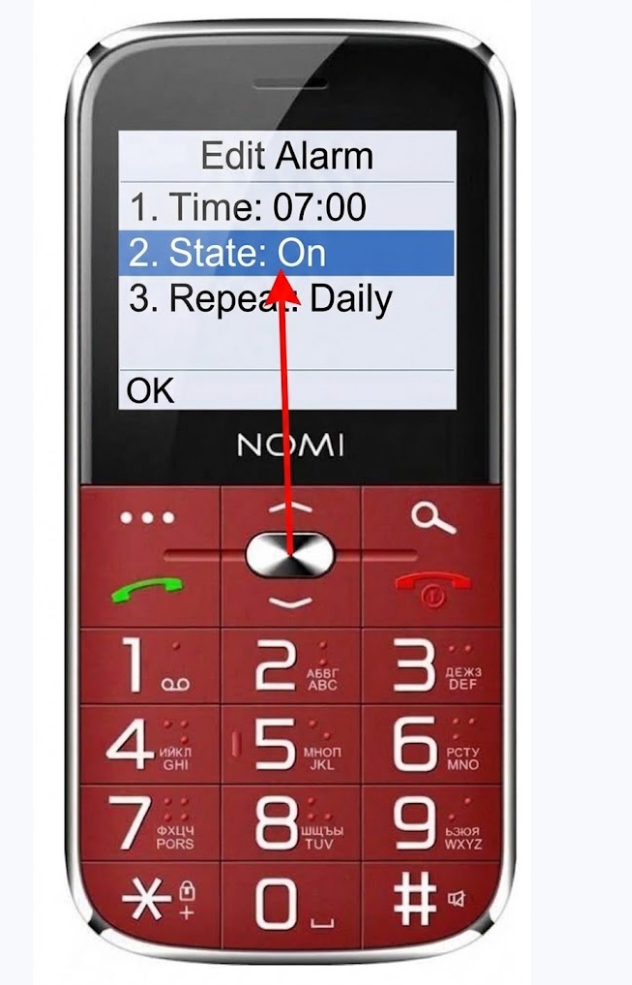
Highlight the alarm that’s bothering you and press OK (or Options, then Edit) to open it.
You’ll see the alarm’s details: the time it rings, whether it repeats, and most importantly its state — On or Off.
Step 5: Switch the Alarm Off
Scroll to the “State” (or “Alarm on/off”) field and press OK to toggle it to Off. Then select “Done” or “Save” to confirm.
That’s it — the alarm is now disabled. You’ll notice the bell icon disappears from the top of your home screen, which is your visual confirmation that no alarm is armed.
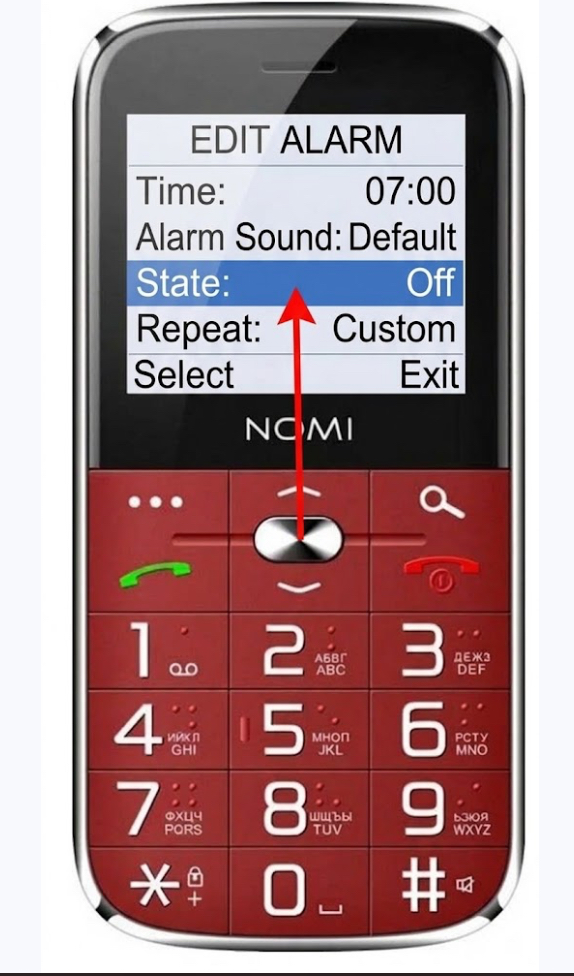
Tip: Want to keep the alarm for later but stop it from ringing this morning? Some menus also offer a “Turn off” soft-key option directly in the alarm list — press the left soft key when the alarm is highlighted. This disables it without deleting the saved time, so you can flip it back on in one step next week.
Extra Tips for Alarm Pros
- Stopping a ringing alarm fast: When the alarm sounds, the screen shows a Stop prompt — press the highlighted soft key (or OK) to silence it. Be careful: on many keypad phones, pressing a random navigation key triggers Snooze instead, and the alarm will return 5–10 minutes later. Always look for “Stop,” not “Snooze.”
- The alarm beats a powered-off phone: As mentioned, the i220 can switch itself on to ring a scheduled alarm. If you truly need silence — a flight, a hospital visit — you must switch the alarm off in the menu, not just power down the phone.
- Delete instead of disable: If an alarm time is useless to you, open it and look for Options → Delete. This removes it permanently and cleans up your alarm list.
- Check the home screen before bed: Get in the habit of glancing at the top of the screen. No bell icon = no alarms armed. It takes one second and saves a lot of mornings.
What Happens After You Turn It Off
Here’s what to expect — and what not to worry about:
- The alarm time stays saved. Turning an alarm off doesn’t erase the time you set. It’s still there, waiting quietly, until you switch it back on or delete it.
- The bell icon disappears. This is normal and is actually your best confirmation that the process worked.
- Your other alarms are unaffected. Each alarm on the list is independent — disabling one leaves the rest exactly as they were.
- The phone’s clock and calendar don’t change. The alarm settings and the time/date settings are separate; nothing else on the phone gets disturbed.
FAQ
How do I stop an alarm that’s ringing right now? Press the Stop soft key or OK when the alarm screen appears. Avoid pressing random side keys — those often activate Snooze, which means the alarm comes back in a few minutes.
Will the alarm ring if the phone is turned off? Yes — most likely. Keypad phones like the Nomi i220 typically power themselves on automatically to sound a scheduled alarm. The only reliable way to prevent it is to disable the alarm in the Organizer → Alarm clock menu.
How can I tell if any alarm is active without opening the menu? Check the top of your home screen for a small bell icon. If you see it, at least one alarm is armed. No bell means no active alarms.
Can I set more than one alarm on the Nomi i220? Yes. The phone supports multiple alarms. Just open Organizer → Alarm clock, choose an empty slot (or Options → Add), set the time, and save. Remember that each one has its own on/off state.
I turned the alarm off, but it rang anyway. What happened? Two usual suspects: you pressed Snooze instead of Stop when it rang last time (a snoozed alarm will fire again), or you disabled a different alarm than the one that was set. Open the alarm list and check which entries still show the bell icon.
Wrapping Up
That’s the whole trick: Menu → Organizer → Alarm clock → select the alarm → set State to Off → Save. Once you’ve done it once, you’ll never fumble with a surprise 6 AM ring again.
Did this guide save your Saturday morning? Share it with a friend or family member who still rocks a trusty keypad phone — and if you hit a step that looks different on your i220, drop a comment below. Happy (quiet) sleeping!
