Ultimate Mortal Kombat 3 Java Game: The Complete Player’s Guide
 By Nathaniel AriyoPublished · 10 min read
If you ever owned a Java-enabled phone in the mid-2000s, you probably remember the frustration of trying to pull off a simple uppercut on a keypad that was never designed for fighting games. Ultimate Mortal Kombat 3 on mobile was not a perfect port, but it was a surprisingly faithful one.
It packed the arcade intensity into a file size smaller than most modern PDFs, and it demanded a completely different skill set than the console version. You could not blame the controller anymore—you had to master the timing of the 5 key.
In this guide, I will walk you through everything from the moment you press the launch button to the second you finally knock Shao Kahn off his throne.
This is not a generic wiki summary. I will tell you exactly what buttons to press, what the menus look like, where beginners waste their health bars, and how the mobile port actually feels compared to other fighters from that era. Let’s get started.
Game Table
| Detail | Info |
|---|---|
| Release Year | 2004–2006 (region-dependent) |
| Developer/Publisher | EA Mobile / Midway |
| Platform | J2ME (Java ME) |
| File Size | ~200–400 KB |
| Game Type | 2D Arcade Fighting |
| Screen Support | 128×128, 176×220, 240×320 |
| Key Difference from Arcade | Reduced roster, simplified fatalities, single-button specials |
History & Background of Ultimate Mortal Kombat 3 Java Game
Ultimate Mortal Kombat 3 arrived in arcades in 1995, but its Java mobile port came nearly a decade later during the mobile gaming gold rush. Studios were racing to put recognizable names on phones like the Nokia N-Series, Sony Ericsson K750i, and Motorola Razr variants. The hardware was incredibly limited: no analog sticks, no shoulder buttons, and screens that struggled to render more than a few frames of animation smoothly.
The Java port was developed to capture the essence of UMK3 rather than clone it.
The full arcade roster of over twenty fighters was trimmed down to a core group of roughly eight to twelve characters, depending on the specific build your phone carrier distributed. Stages were static backgrounds rather than layered environments.
Most importantly, the control scheme was rebuilt from the ground up. A six-button fighter had to become a three-button mobile experience. That constraint is what makes this version unique, and understanding that history is the first step to mastering it.
Screenshots
Key Features Breakdown
Simplified Combat System: The mobile port uses a streamlined three-button layout. You do not have separate high and low punches. Instead, you have a primary attack, a secondary attack, and a block button. Special moves are executed with directional inputs plus a single button, which actually makes them more consistent than the arcade version once you learn the timing.
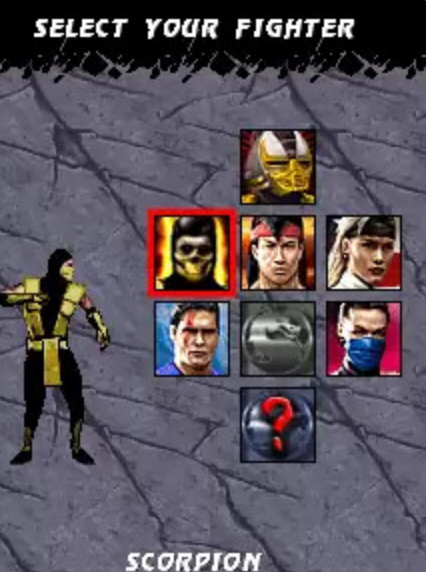
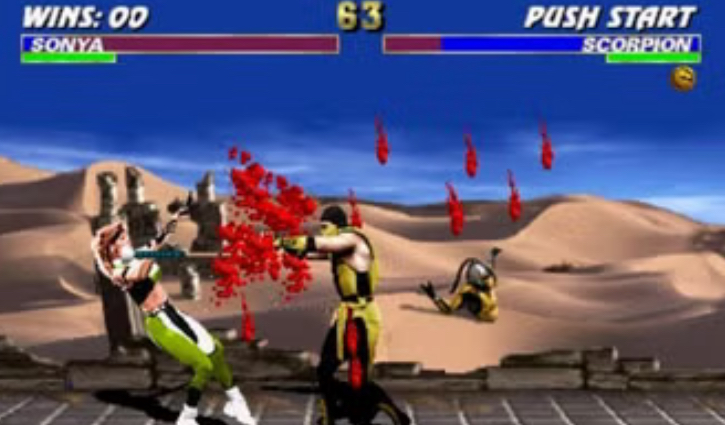
Curated Roster: While you will not see every face from the arcade cabinet, the mobile version focuses on the most mechanically distinct fighters. You still get zoning characters, rush-down characters, and grapplers, so the competitive balance remains intact.
Save System: The game uses a basic password or auto-save system depending on your phone model. If you defeat a boss and see a save prompt, always select Yes by pressing 5. Losing progress because you pressed 4 by mistake is a pain you only experience once.
Audio & Visuals: Expect chiptune renditions of the classic stage themes and digitized grunts instead of full voice acting. The sprites are heavily compressed, but the animation timing for hit-stun and recovery is surprisingly accurate.
Game Modes
Arcade Ladder: This is the standard single-player experience. You fight through a set number of opponents, culminating in the three endurance rounds before the boss fights.
The difficulty spike between Round 4 and the endurance match is significant. I recommend starting on Easy only to learn the menu flow, then moving to Medium for real practice.
Tournament Mode: A bracket-style elimination. You have one life to clear the bracket. If you lose, you restart. The AI here is more aggressive than Arcade mode, so do not enter this until you can consistently block by holding 4.
Practice Mode: This is where you should spend your first twenty minutes. The AI opponent stands still and does not fight back. Use this to practice special move inputs until they feel automatic. If you skip this mode, you will lose repeatedly in Arcade.
Options: Here you can toggle sound effects, music, and difficulty. Use 2 and 8 to scroll, 4 and 6 to toggle settings, and 5 to confirm.
Character Roster & Beginner Recommendations
The exact roster varies by version, but the core lineup usually includes:
- Scorpion
- Sub-Zero
- Liu Kang
- Sonya Blade
- Johnny Cage
- Jax
- Kitana
- Raiden
Top 3 for Beginners:
- Liu Kang: His fireball input is forgiving, and his basic 5 combo string has good range. He is the best character to learn spacing.
- Scorpion: The spear (4, 6, 5) is a fantastic punishing tool. When the opponent whiffs a move from across the screen, that input will pull them into your fist.
- Sonya Blade: She has fast normals and a simple leg grab special that works well against the AI’s tendency to walk forward blindly.
Top 3 for Advanced Players:
- Sub-Zero: The ice blast (8, 6, 5) is powerful but slow to recover if you miss. You need to know exactly when to throw it.
- Jax: His ground pound and rush-down style require you to be in the opponent’s face, which is risky against bosses.
- Kitana: Her fan lift has tricky timing on mobile, but it leads to the most damaging juggles in the port.
How to Play: Menu Navigation (Step-by-Step)
When you launch the game, you will see the developer logo. Do not press anything yet; if you press 5 too early, it might not register. Wait for the Ultimate Mortal Kombat 3 title screen to appear, then press 5 to continue.
You are now at the Main Menu. You will see four options stacked vertically: Arcade, Tournament, Practice, and Options.
- Press 2 to move the cursor up.
- Press 8 to move the cursor down.
- Press 5 to select the highlighted mode.
If you select Arcade, the game will ask you to choose a difficulty. Press 4 to decrease the difficulty (toward Easy) and 6 to increase it (toward Hard). I recommend leaving it on Medium and pressing 5.
Now you are at the Character Select screen. A grid of portraits is displayed. Press 4 to move left through the portraits, 6 to move right. When the fighter you want is highlighted, press 5 to lock in your choice. If you press 2 by accident, you will open the character’s bio screen. To exit the bio, press the soft key labeled Back or press 9, then return to selecting with 4 and 6.
After you confirm, the match loads. The round begins immediately.
How to Play: Combat Controls & Core Mechanics
The mobile port uses a directional pad mapped to your numeric keypad. Here is the exact layout:
- 4: Walk backward / Block (hold when opponent attacks)
- 6: Walk forward
- 2: Jump straight up
- 8: Crouch
- 1: Jump backward
- 3: Jump forward
- 5: Primary Punch
- 7: Kick
- 9: Block (alternative, depending on phone model)
Basic Movement: Do not hold 6 constantly. The AI in this port punishes mindless walking more than you expect. Instead, tap 6 twice to dash forward, then immediately press 5 for a quick jab. This is your safest approach.
Jumping: Pressing 3 is almost always better than 2. You want to jump forward at an angle so you can attack while closing distance. If you press 2, you jump straight up and land where you started, which gives the AI a free hit.
Blocking: Hold 4 when the opponent is close and you see them twitch. Do not tap it; you must hold it through the active frames of their attack. If you release too early, the block will fail.
Crouching: Press 8 to duck under high projectiles. While crouched, press 5 for a crouching punch. This is critical against characters like Liu Kang who throw fireballs at chest level.
Getting Up: When knocked down, do not mash buttons. The game has a fixed recovery time. As soon as you see your character start to stand, hold 4 to block any wake-up attacks from the AI.
Practical Example: In my first match against Scorpion, I kept pressing 5 the moment I got up. He grabbed me every single time. I changed my approach: after the knockdown, I held 4 for one second. He attempted a punch, which I blocked, and then I countered with 6, 5 for a dash jab. That small adjustment won me the round.
Special Moves, Combos & Fatalities In Mortal Kombat Java game
Special moves in the Java port are simplified, but they still require clean inputs. Do not mash the directional keys; press them deliberately.
Scorpion
- Spear: Press 4, then 6, then 5 quickly. Do not hold them. If done correctly, the spear flies out. If you are too close, the spear will whiff over their head.
- Teleport Punch:6, 6, 7 (Forward, Forward, Kick). Use this to punish projectiles from full screen.
Sub-Zero
- Ice Blast:8, 6, 5 (Down, Forward, Punch). This is a zoning tool. When the opponent is walking toward you from across the screen, input this. If they jump, you are vulnerable, so do not spam it.
- Slide:8, 6, 7 (Down, Forward, Kick). Great for low profiling under high attacks.
Liu Kang
- Fireball:6, 6, 5 (Forward, Forward, Punch). Fast startup, use it to keep pressure.
- Flying Kick:6, 6, 7 (Forward, Forward, Kick). A full-screen punish. If the opponent throws a slow projectile, this closes the gap instantly.
Johnny Cage
- Shadow Kick:6, 6, 7 (Forward, Forward, Kick). Unsafe if blocked, so only use it when you see the opponent recovering from a whiffed move.
- Nut Punch:8, 6, 5 at close range. High damage, but you must be practically touching them.
Basic Combos:
- Dash Punch:6, 6, 5 (the second 6 is the dash, 5 is the punch follow-up). This is your bread and butter.
- Crouch Kick into Uppercut:8, 7, then immediately 8, 5. The kick forces them to stand, and the uppercut catches them.
Fatalities: When you see “FINISH HIM” flash on screen, you have a short window. Walk close to the dazed opponent using 6, then input the fatality sequence. In most Java builds, the fatalities are simplified to a three-button sequence. For Scorpion, try 8, 8, 5 at close range. For Sub-Zero, try 4, 4, 5. If nothing happens, you were either too far away or too slow. There is no retry; the match ends.
Comparison with a Game I Played: Street Fighter II Champion Edition (Java)
Before I spent time with Ultimate Mortal Kombat 3 mobile, I played the Java port of Street Fighter II Champion Edition on the same phone. The difference in design philosophy is stark, and it helped me appreciate what UMK3 was trying to do.
In Street Fighter II mobile, the controls felt looser. Ryu’s Hadouken was easier to throw because the input window was generous, but the damage was lower across the board. Matches felt like long poking wars where you traded light kicks until the timer ran down. The AI was defensive and reactive; it rarely walked into your range.
Ultimate Mortal Kombat 3 mobile is the opposite. The AI is aggressive. It walks forward constantly, it throws specials with no regard for your block bar, and matches are over in thirty seconds if you know what you are doing. The damage is high, the combos are shorter but heavier, and the pacing feels closer to the arcade experience than SF2 ever did on mobile.
However, SF2 had one advantage: the training mode was better implemented. It showed you the input history on screen, so you could see that you were pressing 6 too late. UMK3 gives you no such feedback. You have to learn by feel.
If I had thirty minutes to kill on a bus, I would pick UMK3 every time. It respects your time, and the satisfaction of landing a 6, 6, 7 shadow kick into a round-winning combo is something SF2 mobile never quite matched.
>>>> game here
Conclusion
Ultimate Mortal Kombat 3 on Java is a brutal, compressed, and surprisingly honest fighting game. It will not forgive sloppy inputs, and it demands that you learn its mobile-specific rhythm. But once you do—once you can block a shoulder charge with 4, counter with 8, 6, 5, and finish a boss with a clean uppercut—the game feels incredible for what it is. Master the keypad, respect the spacing, and Shao Kahn will fall like everyone else.